In the intricate landscape of remote system administration and secure data transfer, two names frequently emerge as foundational tools: OpenSSH and PuTTY. Both serve the critical function of establishing secure connections, primarily utilizing the Secure Shell (SSH) protocol, yet they cater to distinct user environments, design philosophies, and operational paradigms. Understanding the nuanced differences between OpenSSH and PuTTY is not merely an academic exercise; it is crucial for professionals seeking to optimize their workflow, enhance security, and select the most appropriate tool for their specific needs.
This comprehensive analysis delves into the core functionalities, historical contexts, architectural designs, security postures, and practical applications of OpenSSH and PuTTY, providing a definitive comparison that illuminates their respective strengths and weaknesses in the modern digital ecosystem.
Understanding the Foundations of Secure Shell (SSH)
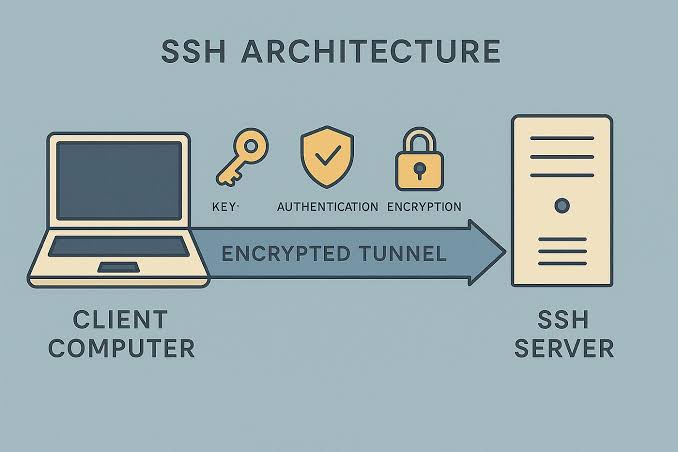
Before dissecting the individual merits of OpenSSH and PuTTY, it is imperative to grasp the underlying technology that empowers them: the Secure Shell (SSH) protocol. Developed as a secure alternative to unencrypted protocols like Telnet and Rlogin, SSH provides a cryptographic network protocol for operating network services securely over an unsecured network. It facilitates secure remote login, command-line execution, and secure file transfers. Key features of SSH include strong encryption, various authentication methods (password, public-key), and the ability to tunnel arbitrary network services. This fundamental security layer is what both OpenSSH and PuTTY leverage to ensure the integrity and confidentiality of remote interactions.
The Pedigree: Brief History of OpenSSH
OpenSSH, short for Open Secure Shell, originated in 1999 as a fork of the original SSH program developed by Tatu Ylönen. Created by the OpenBSD Project, its primary motivation was to provide a free and open-source alternative to the proprietary SSH software, which had begun to introduce licensing restrictions. From its inception, OpenSSH has been developed with a strong emphasis on security, code quality, and auditing. Its tight integration with Unix-like operating systems (Linux, macOS, BSDs) as a native component has cemented its status as the de facto standard for SSH communications in these environments. OpenSSH is not just a client; it is a comprehensive suite that includes the `ssh` client, `sshd` server, `scp` for secure copy, `sftp` for secure file transfer, and `ssh-keygen` for key generation, among others.
The Pedigree: Brief History of PuTTY
PuTTY, developed by Simon Tatham, emerged around the same time as OpenSSH, with its first public release in 1999. Unlike OpenSSH, PuTTY was specifically designed as a free and open-source SSH, Telnet, Rlogin, and raw TCP client for Windows. At a time when native SSH clients were scarce on the Windows platform, PuTTY filled a critical void, quickly becoming indispensable for Windows users needing to connect to Unix-like servers. Its graphical user interface (GUI) and standalone executable nature made it incredibly accessible. Over the years, PuTTY has evolved to support a broader range of protocols and features, maintaining its popularity as a go-to client for cross-platform connectivity from Windows machines.
Core Functionality and Design Philosophy
The fundamental divergence between OpenSSH and PuTTY lies in their design philosophy and intended ecosystem.
OpenSSH: Native Integration and Command-Line Prowess
OpenSSH embodies the Unix philosophy of small, sharp tools designed to do one thing well. It’s an entire ecosystem for SSH, comprising both client and server components (`ssh` and `sshd`). Its deep integration into Unix-like operating systems means it’s often pre-installed or readily available through package managers. Configuration is primarily through text files (e.g., `/etc/ssh/sshd_config` for the server, `~/.ssh/config` for the client), making it highly scriptable and ideal for automation. The command-line interface (CLI) is its natural habitat, offering immense power and flexibility for users comfortable with shell environments. This native, pervasive presence makes OpenSSH the cornerstone of server management and inter-system communication in the Unix world.
PuTTY: Windows-Centric GUI and Client Versatility
PuTTY, in contrast, is fundamentally a client-side application with a strong GUI focus. Its primary role is to provide a user-friendly interface for Windows users to connect to remote servers using SSH and other protocols. While OpenSSH is a comprehensive suite, PuTTY is more of a toolbox for various connection types. Its session management features, where users can save connection profiles, cater to repeated access to different systems without re-entering parameters. The standalone executable model means no complex installation; download and run. This simplicity, combined with its multi-protocol support, positions PuTTY as a highly versatile client for diverse remote access needs, especially for those who prefer graphical interfaces.
Installation and Setup Paradigms
The installation and setup processes for OpenSSH and PuTTY reflect their distinct design philosophies.
OpenSSH: System-Level Integration
On most Linux distributions, macOS, and BSD systems, OpenSSH client (`ssh`) is typically installed by default. The server component (`sshd`) can be easily installed using the system’s package manager (e.g., `sudo apt install openssh-server` on Debian/Ubuntu, `sudo yum install openssh-server` on CentOS/RHEL). Configuration involves editing plain text files. For instance, `~/.ssh/config` allows users to define per-host settings, aliases, and specific authentication methods, streamlining complex connection setups. The recent inclusion of native OpenSSH client and server components in Windows 10/11 as optional features represents a significant shift, bringing OpenSSH’s power to the Windows ecosystem without needing third-party tools or WSL.
PuTTY: Portable Simplicity
PuTTY’s installation is remarkably straightforward. For Windows users, it generally involves downloading a single `putty.exe` executable file. No installation wizard, no system-wide changes, no registry modifications are typically required. This makes PuTTY highly portable; it can be run directly from a USB drive. Configuration is managed through its intuitive GUI, where users can input hostnames, port numbers, select protocols, configure authentication, and save these settings as named sessions. This ease of deployment and graphical configuration makes PuTTY particularly appealing to users who prefer a minimal-fuss approach or operate in environments with strict software installation policies.
User Interface and Experience
The most immediate difference for a new user is the interface.
OpenSSH: The Power of the Command Line
OpenSSH is a pure command-line tool. Users interact with it by typing commands in a terminal.
Example: `ssh username@hostname -p 2222 -i ~/.ssh/id_rsa`.
This CLI approach offers unparalleled power for scripting, automation, and piping output between commands. It’s the preferred choice for system administrators, developers, and power users who live in the terminal and need to integrate SSH commands into larger workflows, cron jobs, or continuous integration/continuous deployment (CI/CD) pipelines. While it has a steeper learning curve for beginners, mastery unlocks significant efficiency gains.
PuTTY: Graphical User Friendliness
PuTTY’s GUI is its defining characteristic. The main PuTTY Configuration window allows users to specify connection details, terminal appearance, SSH settings, and more. Saved sessions streamline repeated connections, allowing users to launch a session with a double-click.
The visual feedback, dropdown menus, and text fields provide a clear, guided experience. This makes PuTTY an excellent choice for users who are new to SSH, those who prefer graphical tools, or simply need to establish quick, one-off connections without memorizing command-line syntax. Its terminal emulator within the GUI is also highly customizable, allowing users to tweak fonts, colors, and key mappings to their preference.
Feature Set Comparison: A Granular Look
While both tools excel at SSH, their feature sets diverge in several critical areas.
Connectivity & Protocols
- OpenSSH: Primarily focused on the Secure Shell (SSH) protocol. It provides the `ssh` client for secure remote login, `scp` for secure file copy, and `sftp` for secure file transfer. Its strength lies in its deep and robust implementation of SSH.
- PuTTY: Supports a wider array of legacy protocols alongside SSH. These include Telnet, Rlogin, Raw TCP, and Serial connections. This versatility makes PuTTY suitable for interacting with a broader range of network devices, such as older routers, switches, or industrial control systems that might not support SSH.
Authentication Methods
Both support standard SSH authentication methods:
- Password Authentication: Simplest, but less secure.
- Public-key Authentication: Highly secure, using a pair of cryptographic keys (private and public).
Beyond these, there are nuances:
- OpenSSH: Fully supports `ssh-agent` for managing private keys and agent forwarding, which allows users to securely use their local private key for authentication on remote servers. It also supports GSSAPI (Generic Security Service Application Programming Interface) for Kerberos authentication in enterprise environments.
- PuTTY: Uses `Pageant` (PuTTY Authentication Agent) as its equivalent to `ssh-agent`. `PuTTYgen` is used to generate keys in PuTTY’s specific format, which can then be converted to OpenSSH format if needed.
Port Forwarding (Tunneling)
Both OpenSSH and PuTTY provide robust capabilities for SSH port forwarding, a powerful feature for creating secure tunnels.
- Local Forwarding: Connects a local port to a port on the remote server.
- Remote Forwarding: Connects a remote port to a port on the local machine.
- Dynamic Forwarding (SOCKS Proxy): Creates a SOCKS proxy, allowing multiple applications to tunnel their traffic through the SSH connection.
Configuration differs:
- OpenSSH: Configured via command-line arguments (e.g., `-L`, `-R`, `-D`) or within the `~/.ssh/config` file, offering high flexibility and scriptability.
- PuTTY: Configured visually through the “Tunnels” section in its GUI, making it approachable for users who prefer point-and-click configuration.
File Transfer
- OpenSSH: Integrates `scp` (Secure Copy Protocol) and `sftp` (SSH File Transfer Protocol) directly. These command-line tools are efficient for transferring files and directories securely. `rsync` over SSH is also commonly used for more advanced synchronization tasks.
- PuTTY: While PuTTY itself is a terminal client, it comes with companion utilities: `PSCP` (PuTTY Secure Copy client) for SCP and `PSFTP` (PuTTY SFTP client) for SFTP. These are separate command-line executables that mimic `scp` and `sftp` functionality.
Terminal Emulation
- OpenSSH: Relies on the host system’s terminal emulator (e.g., `xterm`, `gnome-terminal`, `iTerm2`). The capabilities and customizations depend entirely on the chosen terminal.
- PuTTY: Includes its own highly configurable terminal emulator. Users can customize fonts, colors, scrollback buffer, keyboard mappings, and even the “bell” sound directly within PuTTY’s GUI. This level of granular control over the terminal experience is a significant advantage for users with specific aesthetic or ergonomic preferences.
Key Management
- OpenSSH: Utilizes `ssh-keygen` for generating SSH key pairs. These keys are stored in the `~/.ssh` directory in standard OpenSSH formats. `ssh-agent` manages private keys securely in memory, prompting for passphrases only once per session.
- PuTTY: Uses `PuTTYgen` to generate keys, primarily in its own `.ppk` format. While `PuTTYgen` can convert keys to and from OpenSSH formats, it’s an extra step. `Pageant` serves as PuTTY’s authentication agent, similar to `ssh-agent`.
Scripting & Automation
- OpenSSH: Its command-line nature makes it supremely suitable for scripting. SSH commands can be easily embedded in shell scripts, Python scripts, or any automation framework. Tools like `sshpass` (though generally discouraged for security reasons) or `expect` can automate password-based logins, while key-based authentication with `ssh-agent` simplifies automated, secure connections.
- PuTTY: While PuTTY itself isn’t designed for direct scripting in the same way, its executables (`putty.exe`, `pscp.exe`, `psftp.exe`) can be invoked from batch scripts or PowerShell scripts with command-line parameters. However, automating interactive sessions with PuTTY is more challenging than with OpenSSH.
Security Posture and Considerations
Security is paramount for any remote access tool. Both OpenSSH and PuTTY have strong security track records, but their widespread use and open-source nature mean constant vigilance.
OpenSSH: Audited and Battle-Tested
OpenSSH is renowned for its robust security. Developed by the OpenBSD project, which is famous for its rigorous code auditing and commitment to security, OpenSSH has undergone extensive scrutiny. Its open-source codebase is widely reviewed by the security community. It implements strong cryptographic algorithms and has a history of quickly patching vulnerabilities. Its use as a server component means it’s constantly exposed to attack vectors, contributing to its hardened nature. Best practices like disabling password authentication, enforcing public-key authentication, and regular updates are crucial for maintaining OpenSSH’s security.
PuTTY: Solid Client Security
PuTTY also boasts a strong security record for a client-side application. It is open source, allowing for public scrutiny, and its developers have historically been responsive to security concerns. However, as a client, its security profile is different from a server. User configuration plays a more significant role; for instance, saving passwords in sessions (a feature available in PuTTY) is generally discouraged. While PuTTY is secure when used correctly, the responsibility for secure configuration often lies more directly with the end-user. Regular updates are equally important to leverage the latest security fixes.
Performance and Resource Usage
In terms of performance and resource overhead, both tools are generally lightweight.
OpenSSH: Lean and Efficient
OpenSSH, particularly the `ssh` client and `sshd` server, is designed to be highly efficient and consume minimal system resources. Its CLI nature means no graphical overhead, making it ideal for resource-constrained environments or high-throughput automated tasks. The server component, `sshd`, is optimized for handling numerous concurrent connections without significant performance degradation.
PuTTY: Lightweight Client
PuTTY is also a lightweight application. Its single executable is small, and its memory footprint is minimal for a GUI application. It’s designed to run efficiently on Windows systems, even older ones, without bogging down system performance. While it has a GUI, the overhead is negligible for typical usage.
Platform Compatibility
The landscape of platform compatibility has evolved significantly.
OpenSSH: Unix Native, Windows Ascendant
Historically, OpenSSH was the domain of Unix-like systems (Linux, macOS, BSD). Its native integration and command-line interface are synonymous with these operating systems. However, with Microsoft’s adoption of OpenSSH as an optional feature in Windows 10/11 and Windows Server, OpenSSH is increasingly becoming a first-party solution on Windows. This means users can run `ssh`, `scp`, and `sftp` commands directly in PowerShell or Command Prompt, mirroring the Unix experience. Furthermore, the Windows Subsystem for Linux (WSL) provides a full Linux environment where OpenSSH functions natively, further bridging the gap.
PuTTY: Windows Dominance, Other Ports
PuTTY’s stronghold remains the Windows operating system, where it established its reputation as the essential SSH client. While there are unofficial ports of PuTTY to Unix-like systems and macOS, they are far less common, as OpenSSH is the native and preferred solution on those platforms. PuTTY’s multi-protocol support also makes it relevant for administrators managing diverse network devices from a Windows desktop.
Target Audience and Use Cases
The choice between OpenSSH and PuTTY often boils down to the user’s role, operating system, and specific use case.
OpenSSH: The Professional’s Toolkit
- System Administrators: Managing servers, deploying applications, troubleshooting systems on Linux, Unix, and increasingly Windows Server environments.
- Developers: Interacting with remote development servers, Git repositories over SSH, container orchestration.
- DevOps and Automation Engineers: Scripting remote commands, building CI/CD pipelines, orchestrating deployments.
- Security Professionals: Auditing, penetration testing, secure file transfers.
- Server Environments: Providing the `sshd` server component for secure remote access to millions of servers worldwide.
PuTTY: The Accessible Gateway
- Windows Users: Individuals who primarily work on Windows and need to connect to Linux/Unix servers.
- Beginners to SSH: Its GUI simplifies the initial learning curve for establishing connections.
- Network Engineers: Connecting to a wide array of network devices (routers, switches, firewalls) that might use Telnet, Serial, or Raw TCP in addition to SSH.
- Occasional Remote Access Users: People who only need to connect to a remote server sporadically and prefer a quick, visual setup.
- Portable Use: Running from a USB drive for on-the-go remote access.
Advantages and Disadvantages: A Synthesis
To summarize, a comparative glance at the pros and cons clarifies their respective niches.
OpenSSH Pros:
- Native & Integrated: Deeply integrated into Unix-like OS, and now Windows.
- Comprehensive Suite: Client, server, file transfer tools all in one.
- Highly Scriptable: Ideal for automation, DevOps, and power users.
- Robust Security: Battle-tested, open-source, heavily audited code.
- Minimal Overhead: Command-line nature, very resource-efficient.
- Agent Forwarding: Secure and convenient key management across multiple hops.
OpenSSH Cons:
- Steeper Learning Curve: Primarily CLI, less intuitive for beginners.
- No GUI: Less appealing for users who prefer visual interaction.
- Limited Legacy Protocol Support: Focused solely on SSH protocol family.
PuTTY Pros:
- User-Friendly GUI: Easy for beginners and those preferring visual interfaces.
- Portable: Single executable, no installation required on Windows.
- Multi-Protocol Support: SSH, Telnet, Rlogin, Raw TCP, Serial.
- Session Management: Save and quickly load connection profiles.
- Customizable Terminal: Fine-grained control over terminal appearance.
- Windows Native: Was the dominant SSH client for Windows for years.
PuTTY Cons:
- Client-Only: No server component.
- Less Scriptable: Automation is more cumbersome compared to OpenSSH.
- Key Format Incompatibility: Uses its own `.ppk` format, requiring conversion for OpenSSH keys.
- Less Ubiquitous on Unix: Not the default or preferred choice on Linux/macOS.
- Separate File Transfer Tools: `PSCP` and `PSFTP` are separate executables.
The Modern Landscape: Coexistence and Integration
The advent of native OpenSSH on Windows and the widespread adoption of WSL (Windows Subsystem for Linux) have blurred the lines and often lead to a synergistic coexistence rather than a strict either/or choice. Many professionals on Windows now use both: PuTTY for quick, graphical connections to diverse devices, and the native OpenSSH client in PowerShell or WSL for scripting, automation, or when interacting with other OpenSSH servers more directly.
This evolution highlights that the debate of OpenSSH vs. PuTTY is less about one being inherently “better” and more about which tool is better suited for a particular context or task. OpenSSH remains the backbone of secure remote communication in server environments and the choice for automation, while PuTTY continues to be a highly effective and user-friendly graphical client, especially for Windows users needing broader protocol support or a more visual interface.
In the realm of secure remote access, both OpenSSH and PuTTY stand as titans, each having carved out its indispensable niche. OpenSSH, with its robust, command-line driven, and natively integrated architecture, is the undisputed workhorse for server management, automation, and advanced use cases across Unix-like systems and increasingly within the Windows ecosystem. Its strength lies in its power, flexibility, and foundational role in secure internet communication.
PuTTY, on the other hand, excels as a user-friendly, feature-rich graphical client, particularly on Windows. Its ease of use, session management, and multi-protocol support make it an ideal choice for a broad spectrum of users, from novices to network engineers managing diverse hardware.
Ultimately, the decision between OpenSSH and PuTTY is not a declaration of superiority but a strategic choice based on operating system, workflow requirements, and personal preference. Power users and automation enthusiasts will gravitate towards OpenSSH’s scriptability and native integration. Users seeking a graphical, intuitive experience, especially on Windows, will find PuTTY to be an invaluable tool. In the modern, heterogeneous IT environment, professionals often find themselves leveraging the strengths of both, demonstrating that these two giants of secure connectivity are not just alternatives but complementary components in the arsenal of digital system management.