In the intricate tapestry of modern digital infrastructure, Secure Shell (SSH) stands as a foundational pillar, the undisputed protocol for remote server administration, secure file transfers, and tunnel creation. Its ubiquity, however, renders it a perennial magnet for adversaries, making the security of SSH servers not merely a best practice, but a paramount imperative for any organization operating within the digital realm. A single misconfiguration or oversight can transmute this indispensable utility into a gaping vulnerability, exposing sensitive data, enabling system compromise, and potentially cascading into catastrophic breaches.
This definitive guide delves into the multifaceted dimensions of SSH server security, presenting a deeply comprehensive checklist designed to fortify your systems against a spectrum of threats, from brute-force attacks to sophisticated key compromises. We will navigate through the critical configurations, operational protocols, and architectural considerations necessary to establish a resilient SSH environment, ensuring both robust security and operational efficiency.
The Indispensable Role and Inherent Risks of SSH
SSH’s strength lies in its ability to encrypt all traffic between a client and a server, providing a secure channel over an unsecured network. From deploying applications to routine maintenance, almost every critical task involving a remote server relies on SSH. Yet, this very centrality makes it a high-value target. Attackers relentlessly probe for weaknesses, knowing that a successful compromise of an SSH service can unlock the entire system.
Why SSH Security is Non-Negotiable
The consequences of an insecure SSH server are dire:
- Data Breach: Unauthorized access to sensitive information.
- System Takeover: Attackers gaining root privileges, installing malware, or using the server as a launchpad for further attacks.
- Service Disruption: Denial of service attacks or system instability.
- Reputational Damage: Loss of customer trust and significant financial repercussions.
Common Attack Vectors Against SSH
Understanding the threat landscape is the first step toward effective defense:
- Brute-Force Attacks: Automated attempts to guess usernames and passwords.
- Credential Stuffing: Using stolen credentials from other breaches to gain access.
- Key Compromise: Theft or unauthorized access to private SSH keys.
- Software Vulnerabilities: Exploiting flaws in the SSH daemon or underlying operating system.
- Social Engineering: Tricking legitimate users into divulging credentials.
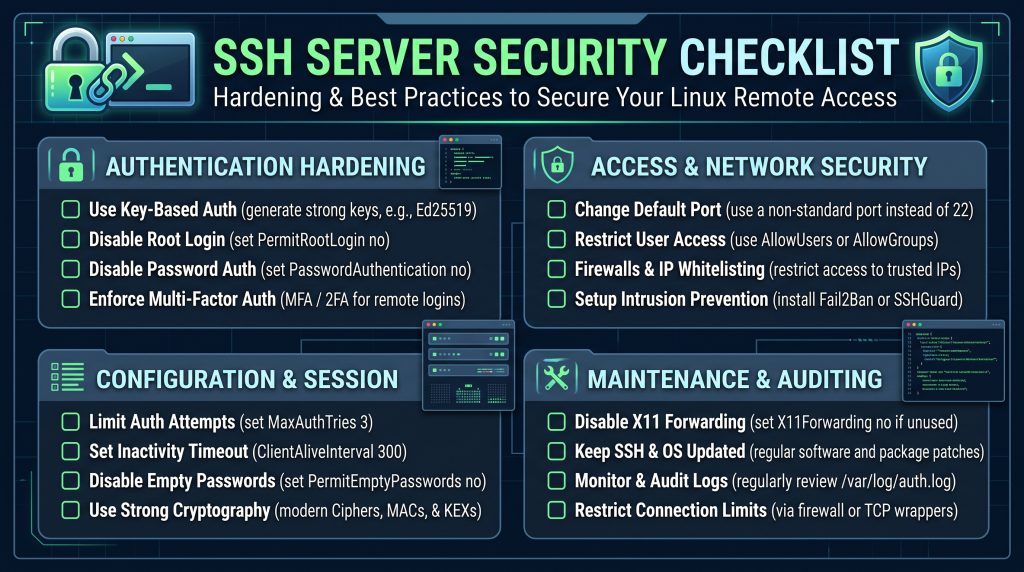
The Definitive SSH Server Security Checklist
Fortifying your SSH server demands a layered approach, integrating stringent configuration with proactive monitoring and diligent maintenance. The following checklist details the essential steps, organized into logical phases for systematic implementation.
Phase 1: Initial Setup & Access Control Foundations
The initial configuration of your SSH daemon (typically `sshd`) and how users interact with it forms the bedrock of your security posture.
Disabling Password Authentication
This is arguably the single most impactful security measure you can take. Password-based authentication is inherently vulnerable to brute-force attacks and credential stuffing.
- Directive: `PasswordAuthentication no` in `/etc/ssh/sshd_config`.
- Rationale: Forces the use of stronger, key-based authentication methods, which are significantly more resistant to automated attacks.
- Action: Ensure all users have SSH keys configured *before* disabling.
Implementing Key-Based Authentication
Leveraging SSH key pairs (a public key on the server, a private key on the client) provides a cryptographically strong alternative to passwords.
- Mechanism: Users generate a key pair (`ssh-keygen`), place the public key (`id_rsa.pub`) in their `~/.ssh/authorized_keys` file on the server.
- Rationale: Keys are much longer and more complex than typical passwords, making them practically impossible to guess. They also mitigate the risk of password compromise through phishing or keyloggers.
- Action: Educate users on key generation and management.
Strong Passphrases for Private Keys
While key-based authentication is superior, a private key without a passphrase is a single point of failure.
- Action: Always protect private keys with strong, unique passphrases. This encrypts the private key on the client machine, requiring the passphrase to unlock it even if the key file itself is stolen.
- Rationale: Adds a second layer of security, making a stolen private key unusable without its corresponding passphrase.
Disabling Root Login Directly
Logging in directly as the `root` user is a major security risk. If a root login is compromised, the attacker immediately gains full control of the system.
- Directive: `PermitRootLogin no` or `PermitRootLogin prohibit-password` in `/etc/ssh/sshd_config`. The latter allows root login *only* via key-based authentication, which is a slightly less secure option than outright disabling.
- Rationale: Forces administrative users to log in with a standard user account and then use `sudo` or `su` for privileged operations, providing an audit trail and an additional authentication step.
- Action: Ensure regular users have `sudo` privileges configured correctly.
Changing the Default SSH Port
While not a security panacea, moving SSH from its default port (22) to a non-standard port (e.g., 2222, 22222) significantly reduces the noise from automated port scanners and brute-force bots.
- Directive: `Port [your_chosen_port]` in `/etc/ssh/sshd_config`.
- Rationale: Deters casual attackers and reduces the volume of malicious traffic directed at your server, making genuine attack attempts easier to spot.
- Caveat: This is “security by obscurity” and should not be relied upon as a primary defense. Remember to update firewall rules.
Restricting Access with `AllowUsers`, `DenyUsers`, `AllowGroups`, `DenyGroups`
These directives provide granular control over who can connect to the SSH server.
- Directive:
- `AllowUsers user1 user2` (only these users can log in)
- `AllowGroups admin_group` (only users in this group can log in)
- Rationale: Implements the principle of least privilege, ensuring only authorized individuals or roles can access the server via SSH.
- Action: Use these to explicitly whitelist permitted users or groups, which is generally safer than blacklisting.
Limiting Login Attempts (`MaxAuthRetries`)
To mitigate brute-force attacks, limit the number of authentication attempts a client can make.
- Directive: `MaxAuthRetries 3` (or a similar low number) in `/etc/ssh/sshd_config`.
- Rationale: Prevents attackers from making an arbitrary number of guesses, significantly slowing down or halting automated attacks.
- Action: Combine with tools like Fail2Ban for more aggressive response.
Phase 2: Configuration Hardening for the SSH Daemon
Once basic access controls are in place, fine-tuning the `sshd_config` file to disable legacy features and employ modern cryptographic standards is crucial.
Using Strong Ciphers, MACs, and KexAlgorithms
SSH relies on cryptographic algorithms for encryption, integrity, and key exchange. Older algorithms may have known weaknesses or be computationally less secure.
- Directive:
- `Ciphers [email protected],[email protected],[email protected],aes256-ctr,aes192-ctr,aes128-ctr`
- `MACs [email protected],[email protected],[email protected]`
- `KexAlgorithms [email protected],diffie-hellman-group-exchange-sha256`
- Rationale: Ensures that only modern, cryptographically strong algorithms are used, protecting against eavesdropping and tampering. Regularly consult security advisories for recommended algorithms.
- Action: Review and update these directives based on current best practices and system compatibility.
Disabling Obsolete Protocols (SSHv1)
SSH Protocol Version 1 (SSHv1) is known to have significant security vulnerabilities and should be unequivocally disabled.
- Directive: `Protocol 2` in `/etc/ssh/sshd_config`.
- Rationale: Eliminates the possibility of downgrade attacks and exposure to known flaws in the SSHv1 protocol.
- Action: Verify all clients support SSHv2 before implementing.
Setting a Sensible `LoginGraceTime`
This directive limits the amount of time a user has to authenticate after connecting.
- Directive: `LoginGraceTime 30` (or 60 seconds) in `/etc/ssh/sshd_config`.
- Rationale: Prevents resource exhaustion attacks where an attacker holds open numerous unauthenticated connections indefinitely, consuming server resources.
Disabling X11 Forwarding (if not needed)
X11 forwarding allows graphical applications from the server to be displayed on the client.
- Directive: `X11Forwarding no` in `/etc/ssh/sshd_config`.
- Rationale: X11 forwarding can introduce security risks, including potential for X11 protocol vulnerabilities or exposing sensitive display data. Disable if not explicitly required.
Disabling Agent Forwarding (with caution)
SSH agent forwarding allows the use of a local SSH agent (which holds your private key) to authenticate to other servers from the remote server.
- Directive: `AllowAgentForwarding no` in `/etc/ssh/sshd_config`.
- Rationale: While convenient, if the remote server is compromised, the attacker could potentially use your forwarded agent to connect to other systems.
- Caveat: This can be useful in complex environments like jump hosts. Evaluate the risk versus operational need.
Disabling TCP Forwarding (if not needed)
TCP forwarding (port forwarding/tunneling) allows arbitrary TCP connections to be tunneled through the SSH connection.
- Directive: `AllowTcpForwarding no` in `/etc/ssh/sshd_config`.
- Rationale: If an attacker gains access to the server, they could potentially use TCP forwarding to pivot to other internal network services or bypass firewalls. Disable if not required.
Disabling `PermitTunnel` (if not needed)
`PermitTunnel` allows for tunneling of layer 2 (Ethernet) or layer 3 (IP) traffic, creating a VPN-like tunnel.
- Directive: `PermitTunnel no` in `/etc/ssh/sshd_config`.
- Rationale: Similar to TCP forwarding, this expands the attack surface. Disable unless you explicitly require SSH for VPN-like functionality.
`StrictModes` Enforcement
This directive checks the permissions of the user’s home directory and `~/.ssh/authorized_keys` file.
- Directive: `StrictModes yes` (default and recommended) in `/etc/ssh/sshd_config`.
- Rationale: Prevents SSH from accepting keys if the home directory or `authorized_keys` file has insecure permissions (e.g., world-writable), safeguarding against local privilege escalation.
`PermitEmptyPasswords no`
Ensures that users cannot log in with empty passwords, even if the system allows it.
- Directive: `PermitEmptyPasswords no` (default and recommended) in `/etc/ssh/sshd_config`.
- Rationale: A basic security hygiene measure.
`UseDNS no` (or `yes` with secure DNS)
When `UseDNS` is set to `yes`, `sshd` will perform a reverse DNS lookup on the connecting client’s IP address and then a forward DNS lookup on the hostname.
- Directive: `UseDNS no` in `/etc/ssh/sshd_config`.
- Rationale: Setting to `no` prevents potential delays if DNS resolution is slow or unavailable, and more importantly, avoids potential spoofing attacks where an attacker controls DNS records to impersonate a legitimate host. If `UseDNS yes` is required for specific `Match` blocks, ensure your DNS infrastructure is highly secure.
`ClientAliveInterval` and `ClientAliveCountMax`
These directives help terminate stale or inactive SSH sessions.
- Directive:
- `ClientAliveInterval 300` (server sends keep-alive every 300 seconds if no data received)
- `ClientAliveCountMax 2` (disconnect after 2 unanswered keep-alives)
- Rationale: Reduces the risk of lingering, unmonitored sessions that could be hijacked.
Phase 3: Network & Host-Based Security Layers
Beyond the SSH daemon itself, the surrounding environment – network firewalls, host-based security tools, and the operating system – plays a critical role.
Firewall Configuration
A properly configured firewall is the first line of defense, restricting access to the SSH port only from trusted sources.
- Tools: `ufw` (Uncomplicated Firewall), `firewalld`, `iptables`.
- Action: Allow SSH traffic only from known IP addresses or specific networks. If port 22 (or your chosen port) must be open to the world, consider geo-blocking or tightly integrating with an IDS/IPS.
- Example (UFW): `sudo ufw allow from 192.168.1.0/24 to any port 22`
Intrusion Detection/Prevention Systems (IDS/IPS)
Tools like Fail2Ban can dynamically block IP addresses exhibiting malicious behavior.
- Tool: Fail2Ban monitors log files for repeated failed login attempts and automatically updates firewall rules to temporarily or permanently ban offending IPs.
- Rationale: Automates the defense against brute-force attacks, reducing the load on your `sshd` service and preventing successful login attempts.
- Action: Install and configure Fail2Ban for SSH, ensuring it monitors the correct log files and applies appropriate ban times.
SSH Honeypots (Advanced Consideration)
For highly sensitive environments, deploying an SSH honeypot can be a valuable intelligence-gathering tool.
- Concept: A decoy SSH server designed to attract, capture, and analyze attack attempts without risking actual production systems.
- Rationale: Provides insights into attacker tactics, tools, and motivations, helping to refine your security posture.
- Action: Research and deploy solutions like Cowrie on a separate, isolated network segment.
Regular OS and SSH Daemon Updates
Software vulnerabilities are a constant threat. Keeping your operating system and SSH daemon updated is paramount.
- Action: Implement a robust patch management strategy. Subscribe to security advisories for your OS and SSH software (OpenSSH).
- Rationale: Patches often contain fixes for critical security vulnerabilities that attackers quickly exploit.
Kernel Hardening (e.g., `sysctl.conf` parameters)
The underlying Linux kernel can be hardened to improve overall system security.
- Action: Configure `sysctl` parameters to disable unnecessary network features, enable SYN flood protection, and randomize memory layout (ASLR).
- Example: `net.ipv4.tcp_syncookies = 1`, `kernel.randomize_va_space = 2`.
- Rationale: Reduces the kernel’s attack surface and mitigates certain classes of exploits.
SELinux/AppArmor Integration
Mandatory Access Control (MAC) systems provide an additional layer of security by restricting what processes can do, even if they run as a privileged user.
- Tools: SELinux (Security-Enhanced Linux) or AppArmor.
- Action: Ensure SELinux or AppArmor is enabled and configured with appropriate policies for `sshd` and other critical services.
- Rationale: Confines potential damage even if an attacker manages to exploit a vulnerability in `sshd`.
Phase 4: Auditing, Monitoring, and Maintenance for Ongoing Vigilance
Security is not a static state but an ongoing process. Continuous monitoring, regular audits, and meticulous maintenance are crucial for long-term resilience.
Enabling Comprehensive SSH Logging
Detailed logging provides the forensic data needed to detect and investigate security incidents.
- Directive: `LogLevel VERBOSE` in `/etc/ssh/sshd_config`.
- Rationale: Records more extensive information about connections, authentication attempts, and command execution, invaluable for incident response.
Regular Log Review and Analysis
Logs are only useful if they are reviewed.
- Action: Establish a routine for manual or automated review of SSH logs (`/var/log/auth.log` or `secure`). Look for unusual login patterns, failed attempts, or unexpected user activity.
Centralized Logging (e.g., ELK, Splunk)
For environments with multiple servers, centralizing logs is essential for efficient analysis and threat correlation.
- Tools: ELK Stack (Elasticsearch, Logstash, Kibana), Splunk, Graylog.
- Rationale: Aggregates logs from all servers, enabling comprehensive monitoring, real-time alerts, and historical analysis across your infrastructure.
Implementing Multi-Factor Authentication (MFA)
Even with key-based authentication, MFA adds a powerful extra layer of security.
- Mechanism: Combine SSH keys with a second factor, such as a Time-based One-Time Password (TOTP) app (e.g., Google Authenticator) or a hardware security key (e.g., YubiKey).
- Tool: `pam_google_authenticator` module for integrating TOTP.
- Rationale: Significantly increases the difficulty for attackers, as they would need to compromise two distinct authentication factors.
Regular Security Audits and Penetration Testing
Periodically assess your SSH security posture through independent audits and controlled penetration tests.
- Action: Engage security professionals to attempt to bypass your SSH defenses.
- Rationale: Identifies unforeseen vulnerabilities, misconfigurations, or new attack vectors that might have emerged.
Maintaining a Clean `authorized_keys` File
The `~/.ssh/authorized_keys` file on the server should only contain public keys for active, authorized users.
- Action: Regularly review and remove old or unused public keys. Ensure no rogue keys exist.
- Rationale: Reduces the attack surface by eliminating dormant access points.
Revoking Compromised Keys Promptly
If a private key is suspected of being compromised, immediate action is required.
- Action: Remove the corresponding public key from all `authorized_keys` files on every server it was used to access.
- Rationale: Prevents continued unauthorized access by the compromised key. Consider rotating all other keys for that user.
Backups of SSH Configuration and Keys
Regularly back up your `sshd_config` file and, if applicable, your SSH host keys.
- Action: Store backups securely, preferably encrypted and off-site.
- Rationale: Facilitates rapid recovery in case of system failure or accidental misconfiguration, minimizing downtime.
Beyond the Checklist: Cultivating a Secure SSH Environment
Achieving and maintaining robust SSH security extends beyond merely ticking off checklist items. It involves embedding security principles into the operational culture and architectural design.
Security Awareness Training
Human error remains a significant vulnerability. Educating users on best practices for managing their private keys, identifying phishing attempts, and understanding the importance of passphrases is crucial.
Automation and Configuration Management
Manual configuration is prone to errors and inconsistencies. Tools like Ansible, Puppet, Chef, or SaltStack can automate SSH hardening across your entire infrastructure, ensuring consistent security policies.
Principle of Least Privilege
Always configure users and services with the minimum necessary permissions. For SSH, this means granting access only to those who absolutely need it, and only to the specific servers or functionalities they require.
Incident Response Plan
Despite all precautions, breaches can occur. A well-defined incident response plan for SSH compromises—including steps for detection, containment, eradication, recovery, and post-mortem analysis—is vital.
Conclusion
The Secure Shell protocol, by its very design, offers a powerful and secure conduit for remote operations. However, its immense utility is mirrored by its appeal to malicious actors. The SSH server security checklist presented here is not an exhaustive list for every conceivable scenario, but rather a robust, deeply comprehensive framework for establishing a formidable defense.
Implementing these measures is not a one-time task but an ongoing commitment to vigilance, adaptation, and continuous improvement. As the threat landscape evolves, so too must our security strategies. By meticulously applying these principles—from the fundamental disabling of password authentication to advanced monitoring and incident response—organizations can transform their SSH servers from potential liabilities into resilient bastions of their digital infrastructure, safeguarding critical assets and preserving operational integrity in an increasingly complex cyber domain.