Unraveling the Digital Veil: What is the Difference Between SSH and VPN?
In an increasingly interconnected world, where digital landscapes are as vast as they are vulnerable, understanding the tools that secure our online interactions is paramount. For professionals navigating the complexities of network security, remote access, and data privacy, terms like SSH and VPN are commonplace. Yet, despite their widespread use and shared objective of fostering secure communication, they operate on fundamentally different principles and serve distinct purposes. This article aims to meticulously dissect these two powerful technologies, providing a comprehensive, advanced-level understanding of their mechanisms, applications, and the critical differences that define their roles in modern cybersecurity.
We will embark on a journey to demystify the Secure Shell Protocol (SSH) and the Virtual Private Network (VPN), exploring their architectural nuances, operational layers, and the specific scenarios where each excels. By the end of this deep dive, you will not only grasp what is the difference between SSH and VPN but also gain the strategic insight to deploy them effectively, individually or in concert, to fortify your digital perimeter and safeguard your data integrity.
Understanding SSH: The Secure Shell Protocol
The Secure Shell Protocol, more commonly known as SSH, is a cryptographic network protocol that enables secure remote command-line access and other secure network services over an unsecured network. Conceived as a secure replacement for insecure protocols like Telnet, rlogin, and rsh, SSH provides a robust framework for establishing a secure channel between a client and a server. It’s an indispensable tool for system administrators, developers, and anyone requiring secure interaction with remote servers.
What is SSH? Core Definition and Purpose
At its heart, SSH is a client-server protocol designed to facilitate secure data communication, remote command execution, and other network services between two networked devices. Its primary purpose is to provide confidentiality, integrity, and authenticity for data exchanged over an untrusted network like the internet. This means that when you connect to a remote server via SSH, your session is encrypted, protected from eavesdropping, and ensures that the data you send and receive hasn’t been tampered with. It essentially creates a secure conduit for specific applications.
How SSH Works: A Glimpse Under the Hood
The operational elegance of SSH lies in its multi-layered approach to security.
- Client-Server Architecture: SSH operates on a classic client-server model. An SSH client initiates a connection to an SSH server (daemon) running on the remote host.
- Authentication Mechanisms: Before any data exchange, the client and server must authenticate each other. SSH supports several authentication methods:
- Password Authentication: The user provides a username and password, which are securely transmitted over the encrypted channel.
- Public Key Authentication: This is the more secure and recommended method. The client generates a pair of cryptographic keys: a private key (kept secret by the user) and a public key (placed on the remote server). During authentication, the server challenges the client, and the client uses its private key to prove its identity without ever exposing the private key itself. This method offers superior security and enables automated logins.
- Host-Based Authentication: Less common, this method relies on the identity of the client host, typically used in trusted internal networks.
- Encryption and Data Integrity: Once authenticated, SSH establishes an encrypted tunnel using strong cryptographic algorithms (e.g., AES, ChaCha20) to protect all subsequent communication. This encryption ensures data confidentiality, preventing unauthorized parties from reading the transmitted data. Additionally, message authentication codes (MACs) are used to ensure data integrity, guaranteeing that the data has not been altered during transit.
- The SSH Handshake Process: When an SSH connection is initiated, a complex handshake occurs. This involves:
- Negotiation: Client and server agree on the SSH protocol version and the cryptographic algorithms (encryption, MAC, compression) to be used.
- Host Key Verification: The server sends its public host key to the client. The client verifies this key against its known_hosts file to prevent man-in-the-middle attacks. This is a critical step for server authenticity.
- Key Exchange: A secure key exchange algorithm (e.g., Diffie-Hellman) is used to establish a shared secret session key, which will be used for symmetric encryption of the session.
- Authentication: The client authenticates to the server using one of the methods described above.
- Session Establishment: Once authentication is successful, a secure, encrypted channel is established, and the client can send commands or data to the server.
Key Use Cases of SSH
SSH’s versatility makes it a cornerstone of modern network operations:
- Remote Command Execution: The most common use is to securely execute commands on a remote server, allowing for complete system administration from anywhere.
- Secure File Transfer: SSH underpins secure file transfer protocols like SCP (Secure Copy Protocol) and SFTP (SSH File Transfer Protocol), enabling users to copy files between local and remote hosts securely.
- SSH Tunneling (Port Forwarding): This is a powerful feature that allows secure tunneling of arbitrary network ports over an SSH connection.
- Local Port Forwarding: Allows you to access a service on a remote network as if it were running on your local machine. For example, accessing a database server behind a firewall.
- Remote Port Forwarding: Allows a remote machine to access a service on your local network.
- Dynamic Port Forwarding (SOCKS Proxy): Creates a SOCKS proxy server on your local machine, routing all traffic from applications configured to use this proxy through the SSH tunnel to the remote server, effectively making the remote server your proxy. This can be used to bypass some firewalls or censorship.
- System Administration: Managing servers, deploying applications, monitoring system health, and troubleshooting issues all rely heavily on SSH.
- Automated Scripts: SSH can be used in scripts for automated tasks, such as backups, deployments, and cron jobs, thanks to public key authentication.
Advantages and Limitations of SSH
Advantages:
- Strong Security: Provides robust encryption, authentication, and integrity checks.
- Versatility: Supports remote command execution, file transfer, and powerful tunneling capabilities.
- Granular Control: Allows precise control over which users can access which resources and with what privileges.
- Lightweight: For its primary function, it adds minimal overhead.
Limitations:
- Application-Specific: Primarily designed for securing direct connections to a specific server or for tunneling specific applications/ports. It doesn’t secure all network traffic from your device by default.
- Configuration Complexity: Advanced features like complex tunneling can be challenging to set up for novice users.
- Single Point of Failure: If the SSH server is compromised, the entire secure channel can be breached.
Understanding VPN: The Virtual Private Network
A Virtual Private Network (VPN) is a service that creates a secure, encrypted connection over a public network, typically the internet. It extends a private network across a public network, enabling users to send and receive data across shared or public networks as if their computing devices were directly connected to the private network. This provides enhanced internet privacy and security.
What is VPN? Core Definition and Purpose
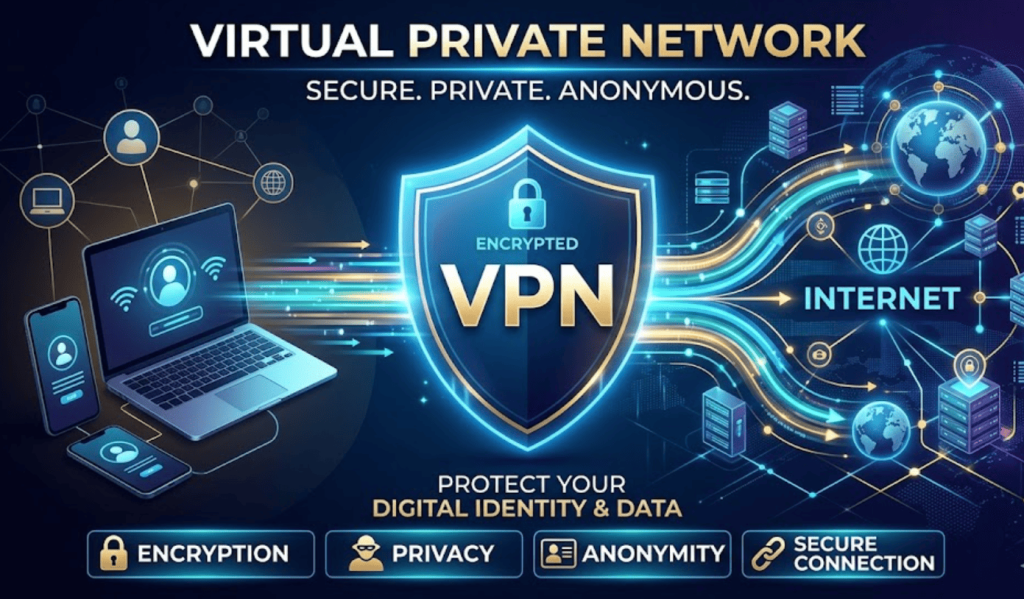
A VPN’s core function is to establish a secure and private “tunnel” between a user’s device and a VPN server. All internet traffic from the user’s device is routed through this encrypted tunnel to the VPN server, which then forwards the traffic to its ultimate destination on the internet. This process effectively masks the user’s real IP address with the VPN server’s IP address and encrypts all data transmitted, protecting it from interception and surveillance. Its primary purposes are to enhance network security, preserve data confidentiality, and enable access to geographically restricted content or private corporate networks.
How VPN Works: Building an Encrypted Tunnel
The operation of a VPN is more encompassing than SSH, affecting all network traffic from a device or even an entire network.
- Encrypted Tunneling: When you connect to a VPN, your device establishes an encrypted tunnel to a VPN server. All your internet traffic is encapsulated and encrypted within this tunnel. This prevents your Internet Service Provider (ISP) or any other third party from seeing your online activities or the data you transmit.
- IP Address Masking: As your traffic exits the VPN server, it appears to originate from the VPN server’s IP address, not your actual IP address. This provides IP masking, enhancing your anonymity and allowing you to bypass geo-restrictions by appearing to be in a different geographical location.
- VPN Protocols: VPNs utilize various protocols to establish and maintain these secure tunnels. Each protocol has its strengths and weaknesses regarding speed, security, and compatibility:
- OpenVPN: An open-source, highly configurable, and secure protocol, widely regarded as one of the best. It uses strong encryption and is very flexible.
- IPsec (Internet Protocol Security): A suite of protocols used to secure IP communications by authenticating and encrypting each IP packet. Often used in conjunction with L2TP (L2TP/IPsec).
- WireGuard: A newer, highly efficient, and modern VPN protocol known for its simplicity, speed, and strong cryptography.
- L2TP/IPsec (Layer 2 Tunneling Protocol over IPsec): A combination that provides good security but can be slower than OpenVPN or WireGuard.
- SSTP (Secure Socket Tunneling Protocol): A Microsoft-developed protocol that uses SSL/TLS for encryption, allowing it to bypass most firewalls.
- VPN Servers and Clients: VPN services typically operate a global network of servers. Users install VPN client software on their devices (computers, smartphones, routers), which connects to a chosen VPN server.
Key Use Cases of VPN
VPNs address a broad spectrum of security and privacy concerns:
- Internet Privacy and Anonymity: By encrypting traffic and masking IP addresses, VPNs prevent ISPs, governments, and advertisers from tracking online activities, thus enhancing internet privacy.
- Bypassing Geo-Restrictions: Users can access content or services that are geographically restricted by connecting to a VPN server in a different country. This is common for streaming services or regional websites.
- Securing Public Wi-Fi: Public Wi-Fi networks are often unsecured and vulnerable to eavesdropping. A VPN encrypts your traffic, protecting your data from malicious actors on shared networks.
- Remote Access to Corporate Networks: Businesses extensively use VPNs to provide secure remote access for employees to internal corporate resources (intranets, file servers, applications) from outside the office. This is a critical component of remote work infrastructure.
- Censorship Bypass: In regions with internet censorship, VPNs can help users bypass restrictions and access the open internet.
Advantages and Limitations of VPN
Advantages:
- Comprehensive Security: Encrypts all network traffic from a device, providing system-wide protection.
- Enhanced Privacy: Masks your IP address and prevents tracking by third parties.
- Geo-Unblocking: Allows access to region-locked content.
- Ease of Use: Most consumer VPNs offer user-friendly applications for easy connection.
- Scalability: Can protect multiple devices or an entire network (router-level VPN).
Limitations:
- Performance Overhead: Encryption and routing traffic through a remote server can introduce latency and reduce internet speed.
- Trust in Provider: You are essentially entrusting your entire internet traffic to the VPN provider, making their trustworthiness paramount.
- Cost: Reputable VPN services typically come with a subscription fee.
- Not a Panacea: While highly secure, a VPN doesn’t protect against all threats (e.g., malware, phishing, weak passwords).
The Core Distinction: SSH vs. VPN — A Comparative Analysis
Having explored SSH and VPN individually, the critical differences become apparent when we place them side-by-side. While both are powerful cybersecurity tools for secure communication, their scope, operational layer, and primary objectives diverge significantly.
Scope and Layer of Operation
This is perhaps the most fundamental distinction.
- SSH: Operates primarily at the application layer (Layer 7) of the OSI model. It secures a specific connection or a specific application’s traffic (e.g., a terminal session, a file transfer, or a forwarded port). It is a point-to-point protocol designed for secure access to a particular host or service.
- VPN: Operates at the network layer (Layer 3) or sometimes the data link layer (Layer 2). It encapsulates and encrypts all network traffic originating from the client device before it leaves the device, routing it through an encrypted tunnel. This provides network-wide security for all applications running on the device.
Purpose and Primary Function
Their design goals are distinct:
- SSH: Primarily designed for secure remote access to a specific server for command-line interaction, file transfer, and specific port forwarding. Its focus is on securing the communication channel to a particular endpoint.
- VPN: Primarily designed for network-wide privacy and security, anonymizing the user’s online presence, and providing secure access to an extended private network over public infrastructure. Its focus is on securing all outbound network traffic and presenting a different network identity.
Network Coverage
The extent of what they secure differs significantly:
- SSH: Secures a single, specific connection or a set of explicitly forwarded ports. If you open a web browser after establishing an SSH connection, that browser traffic is *not* inherently secured by SSH unless explicitly configured via dynamic port forwarding (SOCKS proxy).
- VPN: Secures virtually all internet-bound traffic from the device it’s running on (or the entire network if configured on a router). Once connected, all applications on your device benefit from the encryption and IP masking.
Authentication
While both use strong authentication, their focus is different:
- SSH: Authenticates the user to a specific remote host. The focus is on verifying the identity of the user accessing that particular server.
- VPN: Authenticates the user or device to the VPN server, which then grants access to the wider internet or a private network. The focus is on granting network access.
Complexity and Setup
General perception of setup:
- SSH: Basic usage (remote shell) is straightforward. Advanced features like complex SSH tunnels or sophisticated public key management can be more intricate and require a deeper understanding of network configuration.
- VPN: Consumer VPNs are generally very easy to set up and use, often requiring just a few clicks. Enterprise VPNs or self-hosted VPNs can be more complex to configure but still aim for comprehensive network coverage.
Performance Implications
The impact on network speed:
- SSH: For its primary functions, the performance overhead is minimal as it’s securing a targeted connection. Tunneling specific ports might introduce slight latency, but it’s generally efficient for the traffic it handles.
- VPN: Encrypting and routing all traffic through a potentially distant server inherently adds latency and can reduce overall internet speed. The degree of impact depends on the VPN protocol, server load, and geographical distance.
Security Model
How they secure the connection:
- SSH: Establishes a secure, encrypted channel between two endpoints (client and server). It’s a direct, point-to-point secure link for application-level data.
- VPN: Creates an encrypted tunnel that acts as a secure gateway for all your device’s network traffic. It routes your traffic through an intermediary VPN server, providing a layer of anonymity and security for your entire online presence.
Common Misconceptions and Overlaps
It’s crucial to address areas where their functionalities might seem to overlap, leading to confusion.
- Can SSH replace VPN? Generally, no. While SSH tunneling (specifically dynamic port forwarding via a SOCKS proxy) can route *some* application traffic (like a web browser configured to use the proxy) through a remote server, mimicking a very limited aspect of a VPN, it doesn’t offer network-wide encryption for all applications, nor does it typically offer the same level of IP masking for all outgoing connections as a full VPN. It’s application-specific and more complex to configure for broad use.
- Can VPN replace SSH? Also no. A VPN secures your network connection to a remote network, but it doesn’t provide the direct, interactive command-line access or secure file transfer capabilities that SSH offers to a specific server within that network. You would typically use SSH *over* a VPN connection to access a server securely once you’ve established access to the corporate network via VPN.
Synergy: When SSH and VPN Work Together
Instead of viewing them as mutually exclusive, SSH and VPN can often complement each other, forming a more robust network infrastructure and security posture.
- Using SSH over VPN: This is a common and highly recommended practice. When you connect to a VPN first, your entire internet connection is encrypted and your IP address is masked. Then, when you initiate an SSH connection to a remote server, that SSH traffic is already flowing through the secure VPN tunnel. This adds an extra layer of security, as your SSH connection is protected not only by its own encryption but also by the underlying VPN encryption, making it even harder for third parties to detect or interfere with your SSH session. It also helps bypass firewalls that might block SSH directly but allow VPN traffic.
- Using a VPN to Secure SSH Connections: For organizations, a VPN is often used to create a secure corporate perimeter. Employees connect to the corporate VPN to access internal resources. SSH is then used to securely manage servers *within* that private corporate network. The VPN ensures that all traffic to and from the corporate network is secure, while SSH provides the granular, secure access to individual servers.
Choosing the Right Tool for the Job: Decision Matrix
The choice between SSH and VPN, or when to use both, depends entirely on your specific needs and the security challenge at hand.
- Choose SSH when:
- You need to securely access and manage a specific remote server via the command line.
- You need to securely transfer files to or from a remote server (using SCP or SFTP).
- You need to securely tunnel specific application traffic or ports to a remote host (e.g., accessing a database behind a firewall, creating a SOCKS proxy for specific browser traffic).
- Your concern is secure communication with a known, trusted remote host.
- Choose VPN when:
- You want to secure all your internet traffic and enhance your overall internet privacy and anonymity.
- You need to bypass geo-restrictions or censorship.
- You are using public Wi-Fi and want to protect your entire device’s traffic from eavesdropping.
- You need to securely access a private corporate network from a remote location.
- Your concern is network-wide security and masking your online identity.
- Use both SSH and VPN when:
- You want the utmost security for your remote server management sessions, layering SSH encryption over a VPN tunnel.
- You need to access a specific server within a private corporate network, where the VPN grants you access to the network, and SSH grants you secure access to the server itself.
Conclusion
SSH and VPN, while both indispensable for secure communication in the digital age, are not interchangeable. SSH is a precise, application-layer protocol for secure remote access and specific tunneling, offering granular control over individual connections. VPN, conversely, is a broader, network-layer solution designed to provide comprehensive internet privacy, security, and access to private networks by encrypting and routing all device traffic. Understanding their distinct functionalities, architectural differences, and appropriate use cases is crucial for any professional or user seeking to navigate the modern cyber landscape securely. By leveraging each tool for its intended purpose, or combining their strengths, users can build robust defenses against the myriad of threats that define our connected world, ensuring data integrity and operational continuity.
Comprehensive Question and Answer (Q&A) Section
Q1: Can SSH tunneling completely replace a VPN for general internet browsing and privacy?
A1: No, SSH tunneling, particularly dynamic port forwarding (SOCKS proxy), can route web browser traffic through a remote server, providing a similar effect to a VPN for that specific application. However, it does not offer the comprehensive, system-wide encryption and IP masking that a full VPN provides. A VPN encrypts all network traffic from your device (or network, if configured on a router), including background applications, email clients, and other software, regardless of whether they are explicitly configured to use a proxy. SSH tunneling is application-specific and requires manual configuration for each application, making it less convenient and less thorough for general internet privacy and security compared to a VPN.
Q2: Is one more secure than the other?
A2: Both SSH and VPN protocols are designed with strong security in mind, employing robust cryptographic algorithms and authentication mechanisms. The “more secure” aspect often depends on the implementation and use case. SSH is highly secure for its intended purpose of direct, point-to-point secure access and command execution. VPNs, when implemented with strong protocols like OpenVPN or WireGuard, provide excellent network-wide security. The primary difference lies in their scope: SSH secures a specific connection, while a VPN secures your entire network traffic. A weak password or compromised private key can undermine SSH security, just as a poorly configured VPN server or a less secure VPN protocol (like PPTP) can weaken VPN security. Therefore, both are highly secure when properly configured and used.
Q3: What are the main performance implications of using SSH vs. VPN?
A3: SSH generally has minimal performance implications for its primary functions (remote command execution, file transfer) as it’s securing a targeted connection. Even SSH tunneling for specific ports usually adds only negligible latency. VPNs, on the other hand, encrypt and route all your device’s internet traffic through a remote server, which inherently introduces more overhead. This can lead to increased latency (ping time) and reduced download/upload speeds. The degree of performance impact in a VPN depends on factors like the strength of the encryption, the efficiency of the VPN protocol used (WireGuard is often faster than OpenVPN), the distance to the VPN server, and the server’s load and bandwidth.
Q4: Can I use SSH to bypass geo-restrictions like I would with a VPN?
A4: To a limited extent, yes, but it’s not as straightforward or comprehensive as using a VPN. If you have access to an SSH server in a specific country, you can set up dynamic port forwarding (a SOCKS proxy) through that server. Then, you can configure individual applications (like a web browser) to use this SOCKS proxy. This would make your traffic from those specific applications appear to originate from the SSH server’s location, potentially bypassing geo-restrictions for those applications. However, this method requires more technical setup, only applies to applications configured to use the proxy, and doesn’t provide the system-wide IP masking and encryption that a commercial VPN service offers for all your device’s traffic.
Q5: When should an organization choose SSH for remote access versus a corporate VPN?
A5: An organization should primarily choose a corporate VPN for broad remote access to its internal network resources. A VPN provides a secure, encrypted tunnel that effectively extends the corporate network to the remote user, allowing them to access shared drives, internal applications, and other services as if they were in the office. SSH, however, is ideal for secure, granular access to specific servers or network devices within that corporate network for system administration, maintenance, and development tasks. Often, employees first connect to the corporate VPN to gain access to the private network, and then use SSH to connect to individual servers within that now-accessible private network. SSH provides the secure command-line interface and file transfer capabilities essential for server management that a VPN alone does not offer.
Q6: Are there any scenarios where using both SSH and VPN simultaneously is beneficial?
A6: Absolutely, using both SSH and VPN simultaneously can provide enhanced security and flexibility.
- Layered Security: Connecting to a VPN first and then initiating an SSH session means your SSH traffic is doubly encrypted – once by the VPN tunnel and again by SSH’s own encryption. This makes it significantly harder for any third party to intercept or analyze your SSH communication.
- Bypassing Restrictive Firewalls: If a network’s firewall blocks SSH traffic directly but allows VPN traffic, you can connect to a VPN, and then use SSH over the VPN connection to reach your target server.
- Accessing Internal Servers: In corporate environments, a VPN grants you access to the private corporate network, while SSH is then used to securely manage specific servers or services within that private network.
- Obfuscation: For users in highly censored regions, a VPN might be detected. Using SSH over a VPN can add another layer of obfuscation, making it even more challenging for deep packet inspection to identify your activity.