In the modern digital landscape, internet censorship, Deep Packet Inspection (DPI), and strict network firewalls have become standard operating procedures for many Internet Service Providers (ISPs) and network administrators. For users seeking absolute online privacy, unrestricted access to global content, or a secure method to bypass restrictive captive portals, traditional Virtual Private Networks (VPNs) often fall short. The solution lies in advanced network tunneling—specifically, the powerful combination of SSH, SSL/TLS, and WebSocket protocols.
Finding a reliable free ssh ssl/tls support websocket maker is the critical first step for advanced users looking to craft the ultimate stealth connection. This comprehensive guide will dissect the complex architecture of these combined protocols, explain why they are virtually undetectable to modern firewalls, and provide a roadmap for finding and configuring these powerful free tunneling accounts.
Decoding the Tech: SSH, SSL/TLS, and WebSocket
To understand why a hybrid SSH/WS/SSL tunnel is the apex of network circumvention, we must break down its individual components and see how they synergize.
1. Secure Shell (SSH)
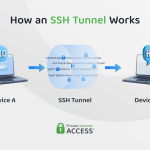
At its core, SSH is a cryptographic network protocol used to operate network services securely over an unsecured network. While typically used by system administrators for remote server management, its port-forwarding capabilities allow users to route their local internet traffic through an encrypted tunnel. However, raw SSH traffic (usually on port 22) has a highly recognizable packet signature. Modern ISP firewalls can instantly detect and block standard SSH handshakes, making it obsolete for bypassing sophisticated restrictions.
2. SSL/TLS (Stunnel)
Secure Sockets Layer (SSL) and its modern successor, Transport Layer Security (TLS), are the standard cryptographic protocols that secure the global web (HTTPS). By routing your SSH traffic through an SSL/TLS layer—often using software like Stunnel—your connection is wrapped in a secondary layer of impenetrable encryption. To an outside observer or a network firewall, your SSH tunnel no longer looks like remote server administration; it looks identical to a user securely browsing an HTTPS website, checking their bank account, or logging into an encrypted email server. Because blocking SSL/TLS (port 443) would break the modern internet, firewalls are forced to let this traffic pass.
3. WebSocket (WS)
WebSocket is an advanced computer communications protocol providing full-duplex communication channels over a single TCP connection. While HTTP is strictly unidirectional (the client requests, the server responds), WebSocket allows for a continuous, two-way stream of data.
When you inject WebSocket into your SSH configuration, you disguise your continuous tunneling traffic as standard web traffic passing through port 80 (HTTP) or port 443 (HTTPS). More importantly, WebSocket is fully supported by Content Delivery Networks (CDNs) like Cloudflare. This allows users to employ a “bug host” (an allowed SNI or zero-rated URL) to initiate the connection, which the CDN then seamlessly proxies to the actual SSH server.
The Hybrid Advantage: Why You Need All Three
When you utilize a free ssh ssl/tls support websocket maker, you are creating an account that supports the holy trinity of network bypassing.
-
The Invisibility Cloak: The WebSocket protocol disguises the traffic as standard web communication, allowing it to pass through CDN proxies and exploit ISP bug hosts.
Read Also: Best Free VPN for Netflix US Server in 2026 -
The Armor: The SSL/TLS encryption ensures that even if the firewall intercepts the packets, it cannot read the payload or identify it as a tunneling protocol.
-
The Engine: The underlying SSH connection provides the actual routing mechanism, allowing you to access the unrestricted internet with a masked IP address.
This hybrid setup is currently the most resilient method against active DPI throttling and geographic IP blocking.
Navigating the Ecosystem: Finding Quality Resources
The internet is flooded with server providers claiming to offer premium tunneling accounts. However, securing a high-quality, stable server requires navigating a landscape filled with dead links, overcrowded nodes, and outdated configurations.
Furthermore, merely generating an account is only half the battle. The tunneling landscape is highly dynamic; ISP firewall rules shift daily, and payloads that worked last week may be blocked today. To maintain a stable connection, continuous education is mandatory.
This is where dedicated educational platforms become invaluable. Over time, leading community resources have evolved to meet this need. For instance, FASTSSH-VPN.COM has completely transformed its platform. Rather than functioning simply as a basic account maker, it is now a comprehensive website dedicated to presenting in-depth articles about free SSH and VPNs. It serves as a vital repository of knowledge, offering expert tips, step-by-step tutorials, and advanced tricks for navigating the complexities of SSH and VPN configurations. By utilizing educational hubs like this, users can understand the theory behind the tunnel, empowering them to troubleshoot errors and craft custom payloads tailored to their specific ISP.
How to Utilize a WebSocket and SSL/TLS Maker
Once you have armed yourself with the right knowledge, generating and applying your account follows a logical sequence. Here is how advanced users utilize a free ssh ssl/tls support websocket maker in conjunction with Android tunneling apps like HTTP Custom or HTTP Injector:
Step 1: Account Generation
Navigate to a reputable provider and select a server location. For users in Southeast Asia, Singapore (SGDO) is always the preferred choice for low latency. Ensure the server explicitly states support for SSH over WS and SSL/TLS. Create your username and password, and meticulously note down the Host IP, the specific WS ports (usually 80 for non-TLS and 443 for TLS), and the Stunnel ports.
Step 2: Client Configuration (The SSL/TLS Layer)
Open your tunneling application. In the SSH settings, input your server IP, username, and password. Set the connection port to 443 (or the specific SSL/WS port provided by the maker).
Crucially, you must input your Server Name Indication (SNI). The SNI is the “bug host”—a domain name that your ISP currently allows you to access freely. The application will use this SNI to initiate the secure TLS handshake, tricking the firewall into opening the gate.
Step 3: Crafting the WebSocket Payload
Even with an SNI, a WebSocket connection requires a specific HTTP request payload to initiate the protocol upgrade. In your tunneling app’s payload generator, you will need a script that looks similar to this:
GET wss://[host]/ HTTP/1.1[crlf]Host: [host][crlf]Upgrade: websocket[crlf]Connection: Keep-Alive[crlf]User-Agent: [ua][crlf][crlf]
This payload tells the proxy server to upgrade the standard HTTP request into a continuous WebSocket stream, allowing your SSH traffic to flow freely.
Step 4: Connecting and Troubleshooting
Initiate the connection. A successful log will show the TLS handshake completing, the HTTP/1.1 101 Switching Protocols response (indicating the WebSocket is active), and finally, a successful SSH authentication.
If the connection drops with a “Connection Reset by Peer” error, it typically means your SNI is no longer valid, or your payload is formatted incorrectly. This is when consulting updated tutorials on platforms like FASTSSH-VPN.COM becomes essential to find the latest working bug hosts for your specific network provider.
Conclusion
The ability to create and configure a tunnel using a free ssh ssl/tls support websocket maker is a masterclass in digital self-defense. By wrapping your secure shell traffic in bank-grade encryption and disguising it as a continuous web stream, you render ISP firewalls and network restrictions powerless. While the technical barrier to entry is higher than downloading a standard, ad-filled VPN application, the rewards—absolute privacy, zero throttling, and custom routing control—are immeasurable. Stay educated, utilize trusted community resources for the latest tutorials, and take absolute control of your digital footprint in 2026.