In the highly competitive world of online gaming, split-second decisions and lightning-fast reflexes dictate the difference between a triumphant victory and a frustrating defeat. Whether you are holding an angle in Valorant, dropping into a hot zone in Call of Duty: Warzone, or executing a complex raid in World of Warcraft, your network connection is just as critical as your hardware.
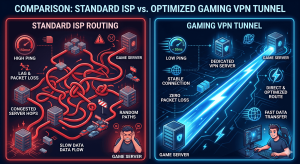
Unfortunately, standard Internet Service Provider (ISP) routing is rarely optimized for the demands of modern gaming. Players frequently suffer from ISP throttling, suboptimal routing hops causing high ping, geo-blocked lobbies, and the ever-present threat of Distributed Denial of Service (DDoS) attacks. A Virtual Private Network (VPN) solves these issues by creating a secure, direct tunnel to the game’s servers.
However, premium VPNs come with hefty monthly subscription fees. If you are a gamer on a budget, you are likely wondering how to get a free VPN server for gaming without sacrificing speed and reliability. In this comprehensive guide, we will bypass the marketing fluff, expose the dangers of standard “free” VPN apps, and reveal the advanced techniques used by professionals to secure high-speed, free VPN access tailored specifically for competitive gaming.
Why Gamers Actually Need a VPN
Before diving into the acquisition methods, it is essential to understand why a VPN is a vital tool in a gamer’s arsenal. Many players mistakenly believe that adding a middleman (the VPN server) will inherently increase latency. While poorly configured VPNs will cause lag, an optimized gaming VPN provides several distinct advantages:
-
Defeating ISP Throttling: ISPs often monitor your data packets. If they detect heavy bandwidth usage from peer-to-peer (P2P) connections or specific gaming servers, they may artificially throttle your speed. A VPN encrypts your payload, blinding your ISP to your activities and ensuring uncapped bandwidth.
-
Optimized Routing (Lower Ping): ISPs use the most cost-effective routing paths, not the fastest ones. This means your data might take unnecessary detours across the country before reaching the game server. By connecting to a VPN server located physically close to the game’s host server, you force a more direct, streamlined route, effectively lowering your ping and reducing packet loss.
-
Access to Geo-Restricted Lobbies: SBMM (Skill-Based Matchmaking) can ruin the casual gaming experience. By utilizing a VPN, gamers can connect to servers in different time zones or regions to access easier lobbies (commonly known as “bot lobbies”) or play with friends overseas.
-
DDoS Protection: Competitive players and streamers are prime targets for DDoS attacks. A VPN masks your actual IP address. If a malicious actor attempts to flood your network, the attack hits the VPN’s robust enterprise-grade servers instead of your home router, keeping you in the game.
The Trap of Standard “Free” VPNs in the Gaming World
If you search the app store for “free VPN,” you will be bombarded with thousands of options. As an advanced user, you must understand a golden rule of cybersecurity: If the product is free, you are the product.
Most commercially available free VPNs are disastrous for gaming for three main reasons:
-
Severe Bandwidth Caps: They often limit you to 500MB to 2GB of data per month—an amount you will burn through in a single afternoon of gaming.
-
Overcrowded Servers: Free providers funnel millions of users into a handful of servers. This creates massive network congestion, resulting in terrifying ping spikes and frequent disconnections.
-
Data Harvesting: Many shady free VPNs log your browsing history, bandwidth usage, and personal data, selling it to third-party advertising brokers.
To truly get a free VPN server capable of handling the demands of online gaming, you must look past the app store and utilize smarter, professional-grade strategies.
Proven Methods: How to Get a Free VPN Server for Gaming
Here are the three most effective, safe, and high-performing methods to secure a free gaming VPN.
Method 1: The “Freemium” Route (Best for Casual Gamers)
A few highly reputable cybersecurity companies offer “freemium” models. They provide a permanently free tier subsidized by their paying premium users. While you won’t get access to their entire global network, you get military-grade security without data harvesting.
-
ProtonVPN: Based in Switzerland, ProtonVPN is the holy grail of free VPNs because it is one of the only trustworthy providers offering unlimited bandwidth on its free tier. While you are restricted to servers in a few countries (usually the US, Japan, and the Netherlands), if one of these aligns with your gaming needs, it provides a highly stable, medium-ping environment.
-
Windscribe: Windscribe offers a generous 10GB of free data per month (if you confirm your email). While 10GB isn’t enough for downloading massive game updates, it is plenty for the actual data packets sent during multiplayer gameplay. Windscribe offers access to over 10 different countries on its free tier, giving you more flexibility for geo-hopping.
Method 2: The Premium Trial Rotation Strategy (Best for Tournaments)
If you have a crucial tournament weekend coming up and need elite, unrestricted access to a premium server (like ExpressVPN, NordVPN, or Surfshark), you can leverage their money-back guarantees.
Virtually all top-tier VPNs offer a no-questions-asked 30-day money-back guarantee. You can sign up, utilize their ultra-fast 10Gbps servers, optimize your connection with the WireGuard protocol, and then request a full refund via live chat on day 29. While not a permanent solution, it is an unbeatable strategy for short-term, high-stakes gaming requirements.
Method 3: The Advanced Cloud VPS Setup (The True “Free Premium”)
If you want the ultimate, permanent free VPN server for gaming, you have to build it yourself. Don’t let this intimidate you; modern scripts make it incredibly easy.
Tech giants like Oracle Cloud and Amazon Web Services (AWS) offer “Always Free” tiers to attract developers. You can claim a free Virtual Private Server (VPS) and install your own VPN protocol on it.
Why this is the ultimate gaming hack:
-
Dedicated IP: You aren’t sharing the server with thousands of other users. The bandwidth is entirely yours.
Read Also: Tricks To Increase Vpn Connection Speed -
Ultra-Fast Speeds: Cloud enterprise data centers have massive fiber-optic backbones, guaranteeing enterprise-grade routing.
-
Zero Logs: Because you own the server, you control the data.
Brief Setup Overview (Oracle Cloud Method):
-
Register for an Oracle Cloud “Always Free” account.
-
Deploy a Compute Instance (choose Ubuntu as your operating system). Select a server location closest to your game’s servers.
Read Also: Tcp Vs Udp Openvpn Which Is Better -
Connect to your VPS via SSH (using software like PuTTY or your terminal).
-
Run an automated WireGuard installation script (like the popular PiVPN script or Angristan’s WireGuard script available on GitHub).
-
The script will generate a
.conffile or a QR code. -
Download the official, free WireGuard client to your PC or smartphone, import the configuration, and connect. You now possess a private, enterprise-grade VPN server for zero cost.
Optimizing Your Free VPN for Maximum Gaming Performance
Getting the server is only half the battle; optimizing it is where you secure the competitive edge.
-
Always Use WireGuard: If your VPN provider (or your self-hosted VPS) gives you a choice of protocols, never use OpenVPN for gaming. OpenVPN is heavy and causes CPU overhead. WireGuard is a modern, lightweight protocol composed of significantly fewer lines of code, offering vastly superior speeds and drastically lower latency.
-
Strategic Server Placement: Distance dictates ping. If you live in New York, and the game server is in Chicago, do not connect to a VPN server in Los Angeles. Connect to a VPN server in Chicago. By putting the VPN server geographically adjacent to the game server, you force your ISP to route your traffic directly to Chicago, bypassing potential domestic bottlenecks.
-
Hardwire Your Connection: A VPN cannot fix a fundamentally unstable local network. For the absolute best results, ensure your PC or console is connected to your router via a Cat6 Ethernet cable rather than relying on Wi-Fi, which is susceptible to radio interference and packet drops.
Conclusion
Securing a high-speed, reliable connection doesn’t have to drain your wallet. By understanding the severe limitations of standard app-store free VPNs, you can elevate your approach. Whether you rely on trustworthy freemium providers like ProtonVPN for casual play, leverage premium trial periods for tournament weekends, or take the ultimate step of deploying your own private WireGuard server on a free Cloud VPS, you now have the knowledge to take control of your network.
By applying the steps outlined in this guide, you can eliminate ISP throttling, bypass unfair SBMM algorithms, and secure the ultra-low latency required to dominate your favorite online games—all completely free of charge.
Are you primarily looking to use this VPN to lower your ping in competitive shooters, or are you more interested in accessing geo-blocked lobbies and easier matchmaking regions?