The landscape of internet privacy and network circumvention is constantly evolving. A few years ago, a standard Virtual Private Network (VPN) or a basic Secure Shell (SSH) tunnel was enough to maintain privacy or bypass basic network restrictions. However, as Internet Service Providers (ISPs) and network administrators deploy increasingly sophisticated Deep Packet Inspection (DPI) technologies, traditional tunneling methods are frequently detected and blocked.
Enter the SSH WebSocket (SSH WS) protocol. This advanced method of routing network traffic has revolutionized the way tech-savvy users approach internet freedom. If you are looking to secure a SSH WebSocket free server, you are stepping into a realm of highly adaptable, stealthy, and efficient digital communication. In this comprehensive, 1000+ word guide, we will break down exactly what SSH over WebSocket is, why it is so effective, and how you can set up a free server to optimize your online experience.
What is an SSH WebSocket Server?
To understand the power of an SSH WebSocket, we must first break down its two core components: SSH and WebSocket.
-
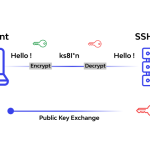
Secure Shell (SSH): SSH is a cryptographic network protocol used to secure data communication over an unsecured network. It creates a highly encrypted tunnel between your device and a remote server. Traditionally, SSH operates on Port 22.
-
WebSocket (WS): WebSocket is a distinct computer communications protocol that provides full-duplex (two-way) communication channels over a single TCP connection. It is heavily used by modern web applications to maintain continuous, real-time data flow between a browser and a server.
Read Also: How Does An Ssh Tunnel Actually Work
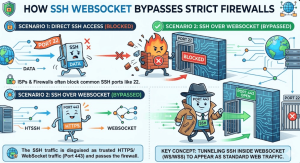
The Synergy: SSH over WebSocket The fundamental flaw of traditional SSH is its visibility. Because it defaults to Port 22, network administrators can easily identify SSH traffic and block it with a simple firewall rule.
By layering SSH over a WebSocket connection, you effectively disguise your encrypted tunnel as standard web traffic. WebSocket connections utilize Port 80 (for standard HTTP) and Port 443 (for secure HTTPS). Because blocking Ports 80 and 443 would essentially break the internet for users on that network, firewalls allow this traffic to pass freely. The firewall sees a standard web request; in reality, it is carrying your encrypted SSH payload.
Why Use a Free SSH WebSocket Server?
There are several compelling reasons why users worldwide seek out free SSH WebSocket servers:
1. Bypassing Deep Packet Inspection (DPI)
In many corporate offices, university campuses, and regions with strict internet censorship, basic VPNs are immediately flagged by DPI. Because SSH WS masquerades as normal HTTPS traffic—often routed through legitimate Content Delivery Networks (CDNs) like Cloudflare—DPI systems cannot easily distinguish it from a user browsing a secure website.
2. High-Speed Content Delivery Network (CDN) Integration
One of the most advanced uses of SSH WS is its compatibility with CDN routing. By pointing your connection to a CDN server (acting as a proxy) and using a specific Server Name Indication (SNI) or Bug Host, you can route your traffic through massive, high-bandwidth server networks. This often results in significantly faster speeds, lower latency for gaming, and smoother video streaming.
3. Cost-Effective Internet Optimization
Premium VPNs and dedicated servers can be expensive. For users on a budget, or those who live in regions with restrictive data caps, utilizing a free SSH WebSocket server alongside custom payload injectors allows for highly optimized network routing without monthly subscription fees.
Key Features to Look for in a Free Provider
Not all free SSH servers are created equal. Because they are free, many are overcrowded, resulting in agonizingly slow speeds. When hunting for a reliable provider, look for these features:
-
Daily Server Resets: The best free providers limit the number of accounts created per server per day (e.g., 50 to 100 slots). This prevents overcrowding and ensures that those who secure an account get full-speed bandwidth.
-
Support for SSL/TLS (Stunnel): Ensure the server specifically supports SSH over WS with SSL/TLS encryption. This ensures your traffic is encrypted twice—once by SSH, and again by the SSL certificate, making it virtually impenetrable.
Read Also: Tricks To Increase Vpn Connection Speed -
Squid Proxy Support: A built-in Squid proxy can help facilitate the WebSocket connection, especially when crafting custom HTTP payloads.
-
Favorable Geographic Locations: Latency (ping) is dictated by physical distance. If you are in Southeast Asia, look for free servers hosted in Singapore. If you are in Europe, aim for Germany or the UK.
How to Set Up Your SSH WebSocket Connection
Setting up a free SSH WebSocket server requires a bit more technical know-how than simply downloading a commercial VPN app. Here is a step-by-step breakdown.
Step 1: Create Your Free Account
Visit a reputable SSH tunneling provider (such as SSHKit, FastSSH, or SSHOcean). Navigate to their “SSH WebSocket” or “SSH WS” section.
-
Choose a server location closest to you.
-
Enter a custom username and password.
-
Click “Create Account.”
-
Save your credentials: You will be given a Hostname/IP, Username, Password, and the required Ports (usually 80 for non-TLS and 443 for TLS).
Step 2: Choose Your Injector Client
To route your traffic through the WebSocket, you need a client capable of injecting HTTP payloads.
-
For Android: HTTP Injector, HTTP Custom, or NapsternetV are the industry standards.
-
For PC (Windows): NetMod, HTTP Proxy Injector (HPI), or utilizing Bitvise combined with an auto-proxy tool.
Step 3: Configure the Payload and SNI
This is the most critical step. You must construct a payload that initiates the WebSocket handshake. While payloads vary based on your specific network, a standard WebSocket payload looks like this:
GET / HTTP/1.1[crlf]Host: [host][crlf]Upgrade: websocket[crlf][crlf]
If you are using TLS/SSL (Port 443), you will also need to input a valid SNI (Server Name Indication). This is often a legitimate web address that your ISP allows to pass freely, which masks the final destination of your traffic.
Step 4: Connect and Verify
Once your server details, payload, and SNI are entered into your chosen application, click “Start” or “Connect.” Check the application’s “Log” tab. If you see HTTP status code 101 Switching Protocols followed by a successful connection message, your WebSocket tunnel is active.
The Reality of Free Servers: Limitations and Security Candor
While the benefits are immense, it is important to ground your expectations in reality when using a SSH WebSocket free server.
1. Short Lifespans and Expirations Free premium servers are not permanent. To manage resources, providers set these accounts to expire after 3, 7, or occasionally 30 days. You must be prepared to create a new account and update your application settings regularly.
2. Anti-Torrenting Rules Never use a free SSH WebSocket server for P2P torrenting. Torrenting causes massive data strain and CPU spikes on the host server. Providers employ strict scripts that will immediately detect torrent traffic, terminate your connection, and permanently ban your IP address from their platform.
3. The Privacy Trade-Off While SSH and WS protocols strongly encrypt your data from your ISP and local network administrators, the endpoint (the server provider) decrypts this data before sending it to the open web. If you use a malicious or untrustworthy free provider, they could theoretically monitor your traffic. Rule of thumb: Do not log into sensitive banking portals or transmit highly confidential unencrypted data while connected to an unknown free server. Use them primarily for bypassing restrictions, gaming, and general browsing.
Troubleshooting Common SSH WS Errors
Even with perfect configuration, network environments change. Here are quick fixes for common errors:
-
Error 302 Found: This usually means your payload or SNI is incorrect, and your network provider is trying to redirect your connection to a captive portal. You need to update your SNI.
-
Connection Refused / Timeout: The free server may be down, or your account has expired. Verify your account validity and try pinging the server IP to check its online status.
-
Premature Connection Close: Your payload is likely flawed, failing the WebSocket handshake. Ensure you have the correct
[crlf]carriage returns in your injector application.
Final Thoughts
Mastering the use of a SSH WebSocket free server grants you unparalleled control over your internet connection. By combining the secure, encrypted nature of SSH with the stealthy, firewall-bypassing capabilities of the WebSocket protocol, you can achieve a level of digital freedom that standard commercial VPNs often struggle to provide. As long as you respect the server rules, keep track of your account expirations, and stay informed on payload configurations, you can enjoy premium-tier internet speeds and privacy at zero cost.