In the intricate tapestry of modern computing, where systems sprawl across continents and data flows incessantly through invisible channels, the imperative for secure communication cannot be overstated. From the individual developer connecting to a remote server to multinational corporations managing vast cloud infrastructures, the need for encrypted, authenticated, and integrity-protected access is universal. At the heart of this digital safeguard lies a protocol often hailed as the bedrock of internet security: Secure Shell, or SSH. More than just a utility, SSH represents a fundamental shift in how we interact with remote systems, transforming precarious open connections into impregnable tunnels of information.
This article delves into the profound architecture and operational mechanics of SSH, dissecting its core components, illuminating its cryptographic genius, and unraveling the step-by-step process that underpins its robust security. We aim to move beyond a mere definition, offering a comprehensive exploration that not only answers “what is SSH?” but also meticulously details “how does it work?”, providing a holistic understanding essential for anyone navigating the complexities of contemporary network environments.
What is SSH? The Unseen Guardian of Remote Access
Secure Shell (SSH) is a cryptographic network protocol designed to allow secure remote command-line access and other secure network services between two networked computers. Conceived as a secure replacement for insecure remote login protocols like Telnet and rlogin, which transmit information, including passwords, in plaintext, SSH has evolved into an indispensable tool for system administrators, developers, and anyone requiring secure interaction with remote machines.
Its genesis traces back to 1995 when Tatu Ylönen, a researcher at the Helsinki University of Technology, developed the first version (SSH-1) in response to a password-sniffing attack on his university’s network. Recognizing the critical need for a more secure alternative, he released SSH-1 as freeware, leading to its rapid adoption. The subsequent development of SSH-2, which rectified several design flaws and vulnerabilities present in SSH-1, became the industry standard and the protocol predominantly in use today. SSH-2 introduced significant improvements in security, including enhanced key exchange methods, more robust encryption algorithms, and better integrity checks, cementing its role as the de facto standard for secure remote access.
Why SSH is Indispensable: Beyond Basic Connectivity
The enduring relevance of SSH stems from its fundamental commitment to three critical security principles:
1. Confidentiality (Encryption): SSH ensures that all data transmitted between the client and server is encrypted, making it unintelligible to eavesdroppers. This prevents unauthorized parties from intercepting sensitive information like commands, output, usernames, and passwords.
2. Authentication: SSH provides mechanisms to verify the identity of both the client and the server. This prevents imposters from gaining access or malicious servers from tricking users into revealing credentials. Both password-based and public-key-based authentication methods are supported, with the latter offering superior security.
3. Integrity: SSH guarantees that data exchanged during a session remains untampered with. It employs Message Authentication Codes (MACs) to detect any alterations, accidental or malicious, ensuring the reliability and trustworthiness of the communication.
These three pillars collectively establish a secure channel over an untrusted network, allowing users to execute commands, transfer files, and even tunnel other network services with confidence, regardless of the underlying network’s inherent insecurities.
The Pillars of SSH: Understanding Its Security Mechanisms
The robust security posture of SSH is not accidental; it is the deliberate outcome of integrating sophisticated cryptographic techniques. Understanding these mechanisms is key to appreciating SSH’s power.
Encryption: The Veil of Secrecy
Encryption is the process of converting information or data into a code to prevent unauthorized access. SSH leverages both symmetric and asymmetric encryption methods at different stages of a connection.
Symmetric Encryption: The Fast Track to Confidentiality
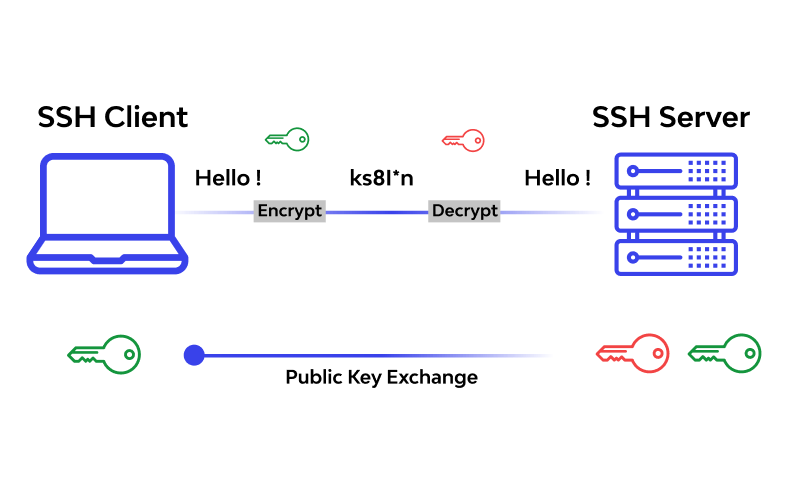
Once a secure channel is established, SSH primarily uses symmetric encryption for all data transmission. In symmetric encryption, the same secret key is used for both encrypting and decrypting data. This method is highly efficient, making it ideal for continuous data streams.
- How it works: After the initial handshake (which uses asymmetric encryption to exchange the symmetric key), both the client and server possess an identical secret key. All subsequent data packets are encrypted with this key before transmission and decrypted with the same key upon reception.
- Common Algorithms: Advanced Encryption Standard (AES), Blowfish, Triple DES (3DES), and ChaCha20-Poly1305 are widely used symmetric ciphers in SSH. The specific algorithm is negotiated during the handshake.
Asymmetric Encryption (Public-Key Cryptography): The Key Exchange and Authentication Engine
Asymmetric encryption, also known as public-key cryptography, uses a pair of mathematically linked keys: a public key and a private key. Data encrypted with one key can only be decrypted with the other. This method is computationally more intensive than symmetric encryption but is crucial for initial secure key exchange and authentication.
- Key Exchange: During the SSH handshake, asymmetric encryption (specifically, algorithms like Diffie-Hellman Key Exchange) is used to securely establish a shared secret symmetric key between the client and server. The beauty of Diffie-Hellman is that the shared secret is never transmitted across the network, even if an attacker intercepts the public keys, they cannot derive the secret without the private key.
- Server Host Key Verification: Each SSH server has a unique public/private key pair, known as its host key. When a client connects for the first time, the server presents its public host key. The client stores this key in its `known_hosts` file. Subsequent connections use this stored key to verify the server’s identity, protecting against Man-in-the-Middle (MITM) attacks. If the server’s key changes unexpectedly, SSH will issue a warning.
- User Authentication (SSH Key-Based Authentication): This is where asymmetric encryption truly shines for user authentication. The user generates a public/private key pair. The public key is placed on the remote server in the `~/.ssh/authorized_keys` file. When the client attempts to connect, it proves possession of the private key by cryptographically signing a challenge sent by the server. The server verifies this signature using the stored public key. This method bypasses the need for passwords and is significantly more secure.
Authentication: Proving Identity
Authentication in SSH ensures that only authorized users and servers can participate in a connection.
Password-Based Authentication
The most straightforward method, where the user provides a username and password. While encrypted during transmission by the negotiated symmetric key, this method is susceptible to brute-force attacks if weak passwords are used.
SSH Key-Based Authentication (Public-Private Key Pair)
This is the recommended and most secure authentication method.
1. Key Generation: A user generates a public-private key pair on their local machine. The private key remains secret and secured, often with a passphrase.
2. Public Key Deployment: The public key is copied to the remote server’s `~/.ssh/authorized_keys` file.
3. Authentication Process:
- The client initiates a connection and indicates it wants to use key-based authentication.
- The server sends a challenge (a random string) to the client.
- The client uses its private key to sign this challenge.
- The client sends the signed challenge back to the server.
- The server uses the public key (from `authorized_keys`) to verify the signature. If the signature is valid, authentication succeeds, proving the client possesses the corresponding private key without ever transmitting the private key itself.
Host-Based Authentication
Less common, this method relies on the server trusting the client machine based on its hostname and host key. It requires careful configuration and is typically used in highly controlled environments.
Integrity: Ensuring Unaltered Data
Beyond confidentiality and authentication, SSH ensures that data exchanged during a session has not been modified in transit. This is achieved through Message Authentication Codes (MACs).
- How MACs Work: A MAC is a small piece of information that authenticates a message and provides integrity and authenticity assurances. Both the sender and receiver compute a MAC based on the message content and a shared secret key. The sender appends the MAC to the message. The receiver computes its own MAC on the received message and compares it to the attached MAC. If they don’t match, it indicates the message has been tampered with.
- Common Algorithms: HMAC-SHA256, HMAC-SHA512, and UMAC are commonly used MAC algorithms in SSH.
How SSH Works: A Deep Dive into the Connection Process
Understanding the theoretical components is one thing; seeing them in action during an SSH connection reveals the protocol’s elegance and complexity. The SSH connection process can be broadly divided into several phases.
The Client-Server Architecture
SSH operates on a client-server model:
- SSH Client: A program on the user’s local machine that initiates the connection (e.g., OpenSSH on Linux/macOS, PuTTY on Windows).
- SSH Server: A daemon running on the remote machine, waiting for connection requests (e.g., `sshd` – the OpenSSH daemon). By default, SSH servers listen on TCP port 22.
The Handshake Protocol (Initial Connection Setup)
This is the crucial first phase where security parameters are established.
1. TCP Connection Establishment (Layer 4):
- The client initiates a standard TCP connection to the server’s SSH port (default 22).
- A three-way handshake occurs: SYN, SYN-ACK, ACK. If successful, a basic network connection is made.
2. Protocol Version Exchange:
- Both client and server exchange strings indicating their supported SSH protocol versions (e.g., “SSH-2.0-OpenSSH_9.0”). They negotiate to use the highest mutually supported version, almost always SSH-2.
3. Algorithm Negotiation:
- The client sends a list of cryptographic algorithms it supports for key exchange, encryption (symmetric cipher), MACs, and compression.
- The server responds with its preferred algorithms from the client’s list. This selection process determines the cryptographic suite for the session.
4. Server Host Key Verification:
- The server presents its public host key to the client.
- First Connection (Trust on First Use – TOFU): If this is the first time the client is connecting to this particular server, the client will display a warning and ask the user to verify the fingerprint of the server’s public key. If accepted, the key (or its fingerprint) is stored in the client’s `~/.ssh/known_hosts` file.
- Subsequent Connections: For subsequent connections, the client compares the server’s presented public key with the one stored in `known_hosts`. If they match, the connection proceeds. If they don’t, it indicates a potential MITM attack or a legitimate key change, and the client will issue a severe warning, preventing the connection by default.
5. Key Exchange (Diffie-Hellman):
- Using the negotiated key exchange algorithm (e.g., Diffie-Hellman Group Exchange), the client and server collaboratively generate a shared secret session key. Critically, this shared secret is never transmitted across the network.
- This session key is a symmetric key that will be used for all subsequent encryption and decryption of data during the session. It’s ephemeral, meaning a new one is generated for each session, enhancing forward secrecy.
Authentication Phase
Once a secure, encrypted channel is established, the client attempts to authenticate itself to the server.
1. Authentication Method Proposal: The client informs the server which authentication methods it prefers (e.g., publickey, password).
2. Server Challenge and Client Response:
- Password Authentication: The server requests a username and password. The client encrypts these credentials using the session key and sends them. The server decrypts and verifies against its user database.
- Public Key Authentication: As detailed earlier, the server sends a challenge, the client signs it with its private key, and the server verifies the signature using the stored public key from `authorized_keys`.
3. Authentication Result: If authentication is successful, the server grants access. If not, the connection is terminated or further authentication attempts are allowed.
Session Phase
Upon successful authentication, a secure, interactive session is established.
1. Secure Channel Establishment: The client and server now have a mutually authenticated and encrypted channel using the negotiated symmetric encryption and MAC algorithms.
2. Interactive Session: The client typically requests a pseudo-terminal (PTY) and shell. All commands entered by the user are encrypted, sent to the server, executed, and the output is encrypted and sent back to the client for display.
3. Forwarding Mechanisms: SSH can forward various types of traffic securely through the established tunnel:
- Port Forwarding (Tunneling): Allows secure redirection of network ports. Local port forwarding (`-L`) redirects traffic from a local port to a remote host/port via the SSH server. Remote port forwarding (`-R`) redirects traffic from a remote port on the SSH server to a local host/port. Dynamic port forwarding (`-D`) creates a SOCKS proxy.
- X11 Forwarding: Securely forwards graphical applications (X Window System) from the remote server to the local client’s display.
- Agent Forwarding: Allows the use of a local SSH agent (which holds private keys) on a remote machine without transferring the private key itself, facilitating multi-hop SSH connections securely.
4. Session Termination: When the user logs out or the connection is broken, the session key is discarded, and the TCP connection is closed.
Key Use Cases and Applications of SSH
The versatility of SSH extends far beyond simple remote command-line access. Its secure tunneling capabilities have made it a cornerstone for numerous vital operations.
- Remote Command Execution and Management: The primary use case. System administrators can securely log into servers, execute commands, manage files, install software, and monitor system health from anywhere.
- Secure File Transfer (SCP and SFTP):
- SCP (Secure Copy Protocol): A command-line utility for securely copying files and directories between local and remote hosts, or between two remote hosts. It uses SSH for authentication and encryption.
- SFTP (SSH File Transfer Protocol): A more feature-rich file transfer protocol that also runs over SSH. It provides a more interactive and robust way to manage files, similar to FTP but with SSH’s security benefits, supporting directory listings, navigation, and more complex file operations.
- Tunneling and Port Forwarding:
- Bypassing Firewalls: Can tunnel traffic for services that might otherwise be blocked by firewalls.
- Securing Insecure Protocols: Encrypts traffic for protocols that inherently lack security (e.g., connecting to a database).
- Creating VPN-like Capabilities: Dynamic port forwarding can act as a rudimentary SOCKS proxy, anonymizing and securing browsing traffic.
- Version Control (Git over SSH): Many developers use Git repositories over SSH to ensure secure and authenticated code pushes and pulls. The SSH key acts as the authentication mechanism to the Git server.
- Automated Tasks and Scripting: SSH can be used non-interactively within scripts to automate deployment, configuration management, and data synchronization across multiple servers, leveraging key-based authentication for seamless execution.
Managing SSH Keys: Best Practices for Security
Given the superiority of key-based authentication, proper SSH key management is paramount.
- Generating Strong Keys: Use `ssh-keygen` with modern algorithms like Ed25519 or RSA with at least 4096 bits.
- Protecting Private Keys with Passphrases: Always encrypt your private key with a strong passphrase. This adds an extra layer of security, requiring the passphrase even if the private key file is compromised.
- Restricting Permissions: Private key files (`id_rsa`, `id_ed25519`) must have strict permissions (`chmod 600`). Public keys (`id_rsa.pub`, `authorized_keys`) typically have `chmod 644`.
- Using `ssh-agent`: The SSH agent temporarily stores decrypted private keys in memory, so you only need to enter your passphrase once per session, even for multiple connections. This avoids repeatedly typing the passphrase while keeping the private key file encrypted on disk.
- Regular Auditing of `authorized_keys`: Periodically review the `authorized_keys` file on your servers to ensure only legitimate public keys are present. Remove keys belonging to former employees or those no longer needed.
- Revoking Compromised Keys: If a private key is suspected of being compromised, immediately remove its corresponding public key from all `authorized_keys` files on relevant servers.
Advanced SSH Features and Configurations
SSH is highly configurable, offering a wealth of options to tailor its behavior for specific needs and security postures.
- The Client Configuration File (`~/.ssh/config`): This file allows users to define custom settings for individual hosts or groups of hosts, simplifying complex connections. Examples include:
- Aliasing hosts (e.g., `Host my_server` instead of `[email protected] -p 2222`).
- Specifying a default user, port, or identity file (`IdentityFile`).
- Configuring local or remote port forwarding for specific hosts.
- Enabling `ControlMaster` for multiplexing multiple sessions over a single connection, improving efficiency.
- SSH Agents (`ssh-agent`, `gnome-keyring`, `KeePass`): Beyond the basic `ssh-agent`, various tools integrate key management directly into desktop environments or password managers, offering convenient and secure handling of private keys.
- Server-Side Configuration (`/etc/ssh/sshd_config`): The `sshd_config` file on the server dictates how the SSH daemon behaves. Critical security configurations include:
- `PermitRootLogin no`: Disabling direct root login.
- `PasswordAuthentication no`: Disabling password-based authentication entirely, forcing key-based authentication.
- `Port 2222`: Changing the default SSH port (a common, albeit minor, security measure to deter automated scans).
- `AllowUsers`, `DenyUsers`, `AllowGroups`, `DenyGroups`: Restricting access to specific users or groups.
- `MaxAuthTries`: Limiting the number of authentication attempts.
- Two-Factor Authentication (2FA) with SSH: For environments demanding the highest security, SSH can be integrated with 2FA solutions (e.g., using Google Authenticator via PAM modules), requiring both a private key (or password) and a time-based one-time password (TOTP) for login.
Common SSH Security Pitfalls and How to Avoid Them
Despite its robust design, SSH’s security is only as strong as its implementation. Misconfigurations or poor practices can create vulnerabilities.
- Weak Passwords for SSH or Private Key Passphrases: The most common and easily exploitable vulnerability. Always use strong, unique passwords and passphrases.
- Unprotected Private Keys: Storing private keys without a passphrase or with loose file permissions can lead to unauthorized access if the local machine is compromised.
- Leaving Password Authentication Enabled with Public Exposure: While disabling root login is good, leaving password authentication enabled on internet-facing servers makes them constant targets for brute-force attacks. Transition to key-based authentication and disable passwords.
- Outdated SSH Versions: Running older SSH server or client software can expose systems to known vulnerabilities. Keep all software updated.
- Lack of Monitoring: Failing to monitor SSH login attempts, especially failed ones, can prevent detection of active brute-force attacks or unauthorized access attempts.
- Overly Permissive `authorized_keys`: Allowing too many keys, especially for users who no longer require access, increases the attack surface.
- Trusting All Server Host Keys: Blindly accepting server host keys without verifying their fingerprint (especially on first connection) can open the door to MITM attacks.
Conclusion
Secure Shell (SSH) is far more than a utility; it is an architectural cornerstone of secure remote communication in the digital age. Its intricate blend of symmetric and asymmetric encryption, robust authentication mechanisms, and integrity checks provides an unparalleled level of security for everything from basic command execution to complex network tunneling. By understanding “what is SSH” at its core and diligently exploring “how it works” through its multifaceted connection process, users and administrators can leverage its full potential.
The enduring relevance of SSH lies in its adaptability and its unwavering commitment to protecting sensitive information from the myriad threats lurking in untrusted networks. Adhering to best practices in key management, carefully configuring both client and server settings, and remaining vigilant against common security pitfalls are not merely recommendations but imperatives. In a world increasingly reliant on distributed systems and remote access, SSH stands as the steadfast guardian, ensuring that our digital interactions remain private, authentic, and untainted. Its mastery is not just a technical skill but a fundamental requirement for secure stewardship of information in the modern era.