The Gamer’s Conundrum: SSH vs. VPN for Optimizing Your Online Experience
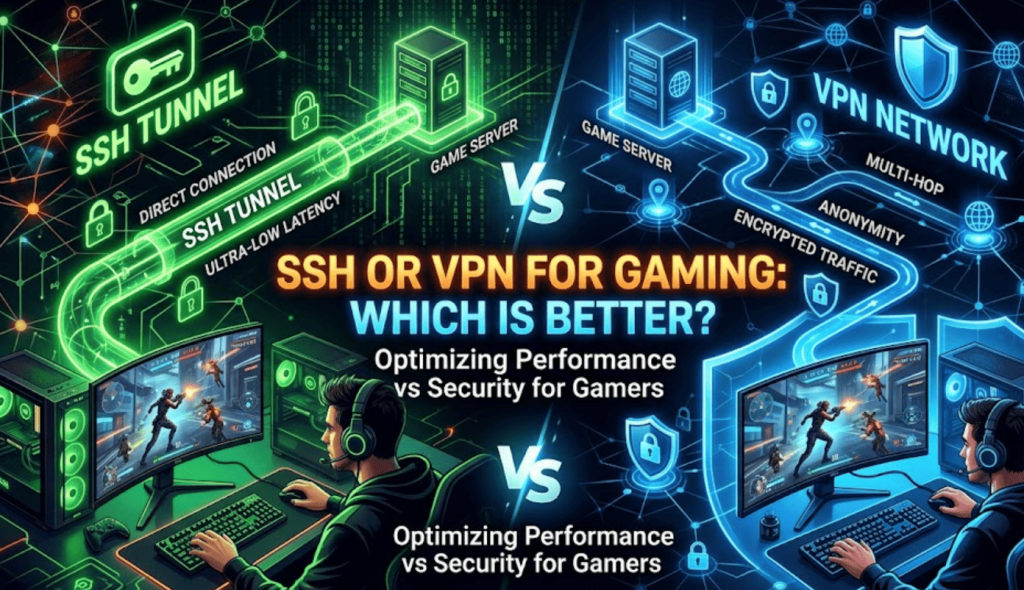
In the dynamic and often fiercely competitive world of online gaming, every millisecond counts. A stable connection, minimal latency, and robust security aren’t just luxuries; they’re foundational pillars of a truly immersive and successful gaming experience. As gamers increasingly seek an edge, or simply a smoother ride, they often encounter discussions around tools like SSH (Secure Shell) and VPN (Virtual Private Network). Both promise enhanced connectivity and security, but their underlying mechanisms, applications, and suitability for gaming differ profoundly.
This comprehensive guide delves deep into the architectural nuances, practical implications, and performance characteristics of SSH and VPN, dissecting their roles in the gaming ecosystem. We aim to equip you with the knowledge to make an informed decision, understanding which technology, if either, is the superior ally in your quest for gaming supremacy. Prepare to navigate the intricate pathways of network optimization, where the right tool can mean the difference between victory and frustrating defeat.
Understanding the Core Technologies: SSH and VPN
Before we can effectively compare their utility in the gaming arena, it’s crucial to establish a clear understanding of what SSH and VPN fundamentally are, and how they operate. While both involve tunneling and encryption, their primary design philosophies and scopes of application diverge significantly.
What is SSH (Secure Shell)?
At its heart, Secure Shell (SSH) is a cryptographic network protocol that enables secure data communication between two networked devices. Its primary purpose is to facilitate secure remote access to computers, allowing users to execute commands, transfer files, and manage systems over an unsecured network. Think of it as a highly secure, encrypted conduit for specific applications or services, rather than a blanket solution for all network traffic.
When you connect via SSH, an encrypted tunnel is established between your client and an SSH server. This tunnel ensures that any data passing through it is protected from eavesdropping and tampering. While its most common use is for command-line access, SSH’s versatile tunneling capabilities, particularly port forwarding and SOCKS proxying, are what make it a consideration for gamers. These features allow specific network traffic (like that of a particular game) to be routed through the secure SSH connection, potentially bypassing local network restrictions or finding a more optimal routing path to a game server.
What is VPN (Virtual Private Network)?
A Virtual Private Network (VPN), by contrast, is designed to create a secure, encrypted connection over a less secure network, typically the internet. Its core function is to extend a private network across a public network, allowing users to send and receive data as if their computing devices were directly connected to the private network. This means your entire internet connection, from web browsing to streaming to gaming, is routed through the VPN server.
When you connect to a VPN, your device establishes an encrypted tunnel to a VPN server. All your internet traffic then travels through this tunnel, exiting onto the internet from the VPN server’s location. This process effectively masks your true IP address, encrypts your data, and can make it appear as though you are browsing from a different geographical location. VPNs are often employed for privacy, security, and bypassing geo-restrictions, making them a popular choice for a wide range of internet users, including gamers.
Performance Metrics Critical for Gaming
For gamers, the effectiveness of any network solution boils down to a few critical performance indicators. Understanding how SSH and VPN impact these metrics is key to determining their value.
Latency (Ping): The Gamer’s Nemesis
Latency, commonly referred to as “ping” in gaming circles, measures the time it takes for a data packet to travel from your computer to a game server and back. It’s typically measured in milliseconds (ms).
* Impact on Gaming: High latency leads to noticeable “lag,” where your actions in the game are delayed, causing frustration and a significant competitive disadvantage. In fast-paced multiplayer games, even a difference of 20-30ms can be critical.
* How SSH/VPN Affect It: Both SSH and VPN introduce an additional hop in your network path (the server you connect to). This inherently adds some latency. The extent of this addition depends on:
* The physical distance to the SSH/VPN server.
* The quality and load of the server.
* The efficiency of the encryption protocol used.
* The routing path from your device, through the SSH/VPN server, to the game server. Sometimes, a VPN or SSH tunnel can paradoxically *reduce* ping if your ISP’s default routing is inefficient or congested, by providing a more direct or less congested path.
Bandwidth: The Data Highway
Bandwidth refers to the maximum amount of data that can be transferred over a network connection in a given amount of time, usually measured in megabits per second (Mbps).
* Impact on Gaming: While online gaming itself doesn’t require enormous bandwidth for gameplay (often just a few Mbps), sufficient bandwidth is crucial for downloading game updates, streaming game content, voice chat, and ensuring a stable connection without data bottlenecks.
* How SSH/VPN Affect It: Both technologies introduce encryption overhead, which consumes a small portion of your available bandwidth. More significantly, the speed of your connection through an SSH or VPN server is limited by the server’s own bandwidth and the capacity of the network links it uses. If the server is overloaded or has poor infrastructure, your effective bandwidth can be significantly reduced.
Packet Loss: The Invisible Killer
Packet loss occurs when data packets traveling across a network fail to reach their destination.
* Impact on Gaming: Even small amounts of packet loss can severely degrade the gaming experience, leading to “teleporting” characters, missed inputs, sudden freezes (jitter), and even disconnects. It’s often more disruptive than consistently high latency.
* How SSH/VPN Affect It: Both SSH and VPN tunnels can exacerbate packet loss if the server they connect to is unstable, overloaded, or experiencing network issues. The added complexity of the tunnel can also make network diagnostics more challenging if packet loss occurs. A reliable server and stable network path are paramount to avoiding this issue.
SSH for Gaming: A Niche Application
While not its primary design, SSH can indeed be leveraged for specific gaming scenarios, primarily through its tunneling capabilities.
The Mechanics of SSH Tunneling for Gaming
To use SSH for gaming, you typically employ one of two methods:
1. Local Port Forwarding: This involves forwarding a specific local port on your machine to a port on the remote SSH server, which then forwards it to a destination server (e.g., a game server). It’s highly specific.
2. SOCKS Proxy over SSH: This is a more flexible method. You can configure an SSH client to act as a SOCKS proxy, routing all traffic from applications configured to use that proxy through the SSH tunnel. This is often preferred for gaming as it can handle multiple connections for a single application more gracefully than simple port forwarding.
In both cases, you need access to a reliable SSH server, ideally one with low latency to both your location and the game server’s location. Setting up your own SSH server on a VPS (Virtual Private Server) is a common approach for technically adept users.
Advantages of SSH for Gaming
* Granular Control: SSH allows you to route traffic for only specific applications or ports. This means other internet activities on your device aren’t affected by the tunnel, potentially preserving bandwidth for them.
* Potentially Lower Overhead (Conditional): If configured perfectly and only for very specific traffic, an SSH tunnel *can* sometimes introduce less encryption overhead than a full VPN, especially if you’re comparing it to an older, less efficient VPN protocol. However, this is highly dependent on implementation.
* Bypassing Port Blocks: SSH can be extremely effective at circumventing local network firewalls (e.g., at schools, universities, or workplaces) that block specific game ports. Since SSH typically uses port 22, which is often open for administrative purposes, you can tunnel your game traffic through it.
Disadvantages and Limitations of SSH for Gaming
* Complexity: Setting up and configuring SSH tunnels or SOCKS proxies for gaming requires significant technical expertise. It’s not a plug-and-play solution. You need to understand network ports, protocols, and command-line interfaces.
* Single Point of Failure: Your entire gaming connection relies on the stability and performance of a single SSH server. If that server goes down, your connection is lost.
* Limited Scope: SSH is not designed for comprehensive privacy or security for your entire device. It only encrypts and tunnels the specific traffic you configure it for. It won’t mask your IP address for general browsing or protect you from DDoS attacks targeting your home IP.
* Performance Variability: The quality of your SSH connection is entirely dependent on the SSH server you use. If you don’t own or have access to a high-quality, low-latency server, performance can be poor. Finding such a server that is also strategically located relative to your game server can be challenging.
* No Geo-Unblocking for Entire System: While it can route specific game traffic, it won’t help you access geo-restricted content or games on a system-wide level like a VPN does.
VPN for Gaming: The Broad-Spectrum Solution
VPNs have emerged as a more mainstream and user-friendly solution for various online needs, including gaming. Their comprehensive approach to network tunneling offers several advantages for gamers.
How VPNs Enhance the Gaming Experience
* Geo-Unblocking: This is one of the most common reasons gamers use VPNs. By connecting to a server in a different country, you can access region-locked games, play on servers in other geographical locations, or even purchase games at different regional prices (though this can sometimes violate terms of service).
* DDoS Protection: In competitive gaming, malicious players sometimes launch Distributed Denial of Service (DDoS) attacks to flood an opponent’s internet connection, forcing them offline. A VPN masks your true IP address, making it significantly harder for attackers to target you directly. They’d only see the VPN server’s IP.
* ISP Throttling Mitigation: Some Internet Service Providers (ISPs) may intentionally slow down (throttle) specific types of traffic, including gaming data, during peak hours to manage network congestion. By encrypting all your traffic, a VPN makes it difficult for your ISP to identify and selectively throttle your gaming data, potentially leading to more consistent speeds.
* Privacy and Security: Beyond gaming, a VPN enhances your overall online privacy and security by encrypting all your data and masking your IP address, protecting you from surveillance and potential cyber threats.
Advantages of VPN for Gaming
* Ease of Use: Reputable VPN services offer user-friendly applications for various platforms (Windows, macOS, Linux, mobile, even routers). Connecting to a server is often a one-click process, requiring no technical expertise.
* Global Server Network: Leading VPN providers boast thousands of servers in dozens of countries. This allows gamers to choose a server location strategically close to their game server for optimal ping, or in a specific country for geo-unblocking.
* Comprehensive Protection: A VPN encrypts and routes all your device’s internet traffic, providing system-wide privacy, security, and IP masking.
* Feature-Rich Services: Premium VPNs offer features like a “kill switch” (which cuts your internet connection if the VPN drops, preventing IP leaks), split tunneling (allowing you to choose which apps use the VPN and which don’t), and dedicated IP options.
* Optimized for Performance: Many VPN providers invest heavily in high-speed servers and optimized protocols (like WireGuard) specifically designed to minimize latency and maximize throughput, making them increasingly viable for gaming.
Disadvantages and Considerations of VPN for Gaming
* Inherent Latency Increase: Despite optimizations, routing all your traffic through an additional server and encrypting it will almost always add some degree of latency. The goal is to minimize this increase by choosing a fast, close server.
* Cost: Quality VPN services are subscription-based. While free VPNs exist, they are often unreliable, slow, data-limited, and may compromise your privacy by logging and selling your data.
* Potential for Performance Degradation: If you choose a poor VPN server (overloaded, far away, or low quality), your ping can worsen significantly, and your bandwidth might drop. Careful server selection is crucial.
* Detection by Anti-Cheat: While rare for reputable VPNs, some aggressive anti-cheat systems in certain games might flag VPN usage, potentially leading to temporary bans. This is more common with free or less-known VPNs or those associated with known cheaters. Always check the game’s terms of service.
* Bandwidth Caps: Some VPNs, especially free ones, impose bandwidth limits, which can be problematic for gamers.
Direct Comparison: SSH vs. VPN for Gaming
Let’s distill the core differences into a direct comparison to help clarify which might be better suited for specific gaming needs.
Latency & Speed:
* SSH: Can be lighter if configured for minimal overhead (e.g., a simple SOCKS proxy) and if you have access to a very high-quality, low-latency SSH server. However, setup complexity often means suboptimal configurations. Its effectiveness in reducing latency is highly conditional and often hard to achieve consistently.
* VPN: Generally introduces some latency due to encryption and routing all traffic. However, premium VPN services with optimized protocols (like WireGuard) and vast server networks often provide more consistent and potentially lower latency than a poorly set up SSH tunnel, especially if they can route your traffic more efficiently than your ISP. The key is choosing a server close to your game server.
Security & Privacy:
* SSH: Provides secure encryption for specific application traffic. It does not mask your IP address for general internet use or provide system-wide privacy.
* VPN: Offers comprehensive, system-wide encryption and IP masking. It protects all your online activities and significantly enhances your overall privacy and security profile.
Ease of Use:
* SSH: Requires significant technical expertise for setup, configuration, and troubleshooting. Not user-friendly for the average gamer.
* VPN: Extremely user-friendly with intuitive applications. Connects with a few clicks, making it accessible to all gamers.
Bypassing Restrictions:
* SSH: Excellent for bypassing local network firewalls that block specific game ports, by tunneling through a commonly open port (like 22).
* VPN: Superior for bypassing geo-restrictions (accessing region-locked games/servers) and mitigating ISP throttling.
DDoS Protection:
* SSH: Does not inherently protect against DDoS attacks targeting your home IP, as it only tunnels specific traffic. Your true IP remains exposed for other connections.
* VPN: Provides robust DDoS protection by masking your real IP address, making it much harder for attackers to target you directly.
When to Choose Which for Gaming
Making the right choice hinges on your specific needs, technical proficiency, and the problems you’re trying to solve.
Opt for VPN if:
* You need to bypass geo-restrictions to access region-locked games, servers, or content.
* You want comprehensive DDoS protection to safeguard against malicious attacks.
* You suspect your ISP is throttling your gaming traffic.
* You prioritize ease of use and a straightforward setup process.
* You desire overall online privacy and security for all your internet activities, not just gaming.
* You play a variety of online games and want a flexible solution for different scenarios.
* You are looking for a potentially more optimized routing path to game servers than your ISP provides, aiming for lower ping.
Consider SSH if:
* You are highly technically proficient and comfortable with command-line interfaces and network configurations.
* Your primary goal is to route traffic for a very specific application or port (e.g., a single game) without affecting other network traffic.
* You need to bypass a local firewall that specifically blocks game ports (e.g., at a university or workplace network) but allows SSH traffic.
* You have access to, or can reliably set up, a private, low-latency SSH server strategically located close to your game server.
* You are concerned with the absolute minimal overhead for a *single* game process and are willing to invest the technical effort.
* You are experimenting with network optimization and enjoy hands-on configuration.
Optimizing Your Gaming Network: Beyond SSH and VPN
While SSH and VPN can be powerful tools, they are just one piece of the puzzle. A truly optimized gaming network requires a holistic approach.
Wired Connection is King
Always prioritize an Ethernet cable connection over Wi-Fi for gaming. Wired connections offer superior stability, lower latency, and less susceptibility to interference compared to wireless.
Router Optimization
Your router is the gateway to your home network. Ensure it’s performing optimally:
* Quality of Service (QoS): Enable QoS settings on your router to prioritize gaming traffic over other activities like streaming or downloads.
* Firmware Updates: Keep your router’s firmware updated to benefit from performance enhancements and security patches.
* Placement: If using Wi-Fi for other devices, ensure your router is centrally located and free from obstructions.
ISP Selection
The foundation of your internet connection is your Internet Service Provider.
* Fiber Optic Internet: If available, fiber optic connections generally offer the lowest latency and highest speeds.
* Reputable Providers: Choose an ISP known for reliable service and good customer support in your area.
* Connection Type: Understand the difference between cable, DSL, and fiber, and choose the best option for your needs.
Game Server Location
Always try to connect to game servers that are geographically closest to you (or your chosen VPN/SSH server). Proximity directly impacts latency.
Cloud Gaming Considerations
For cloud gaming services like GeForce Now or Xbox Cloud Gaming, a stable, low-latency connection is even more critical. Here, a VPN might help you connect to a server closer to the cloud gaming data center, but the added latency of the VPN itself can sometimes negate the benefits.
Conclusion: The Verdict on SSH vs. VPN for Gaming
After a thorough examination, the verdict is clear for the vast majority of gamers: a Virtual Private Network (VPN) is generally the superior and more practical choice for enhancing the online gaming experience. Its ease of use, comprehensive system-wide protection, global server networks, and robust features like DDoS protection and geo-unblocking make it an invaluable tool for modern gamers. While it introduces inherent latency, premium VPN services are increasingly optimized to minimize this impact, often providing more stable and sometimes even faster routes than default ISP connections.
SSH, on the other hand, remains a powerful, niche tool for the technically proficient. It excels in highly specific scenarios, such as bypassing local firewall restrictions for individual applications or when a gamer has access to a perfectly positioned, low-latency SSH server. However, its complexity, limited scope, and lack of system-wide protection make it less suitable for the average gamer seeking a broad solution.
Ultimately, the best approach involves a combination of factors: a high-quality internet connection, an optimized home network, and, for many, a reputable VPN service. While SSH offers a glimpse into granular network control, the VPN provides a comprehensive, user-friendly, and secure pathway to a more enjoyable and competitive online gaming journey. Choose wisely, and may your pings be ever low!
Question and Answer (Q&A) Section
Q: Can SSH reduce my ping more than a VPN?
A: In highly specific and technically optimized scenarios, an SSH tunnel might theoretically introduce slightly less overhead than a full VPN, potentially leading to marginally lower ping for a single application. However, this is exceptionally difficult to achieve consistently. VPNs, especially those using modern protocols like WireGuard and boasting vast, optimized server networks, often provide more reliable and sometimes even better routing for reducing ping compared to a typical SSH setup, simply due to their scale and engineering focus on performance.
Q: Is it safe to use a VPN for online gaming?
A: Yes, using a reputable VPN for online gaming is generally safe. It enhances your security by encrypting your data and masks your IP address, protecting you from DDoS attacks and increasing your privacy. However, always choose a trusted, paid VPN service. Free VPNs often come with significant security risks, performance issues, and privacy compromises.
Q: Will using SSH or VPN get me banned from games?
A: For most games, using a VPN or SSH for general connectivity or geo-unblocking will not result in a ban. Many gamers use them to access different regions or enhance security. However, some highly competitive games with strict anti-cheat systems might flag VPN usage, especially if it’s associated with known cheating activities or if you’re attempting to exploit regional pricing differences. Always check the game’s terms of service. SSH, being less common, is less likely to be specifically targeted, but any unusual network activity could theoretically draw attention.
Q: What’s “split tunneling” and how does it help gaming?
A: Split tunneling is a VPN feature that allows you to route some of your device’s internet traffic through the VPN tunnel while allowing other traffic to bypass it and connect directly to the internet. For gaming, this is highly beneficial because you can route only your game’s traffic through the VPN (e.g., to reduce ping or bypass geo-restrictions) while your other applications (like streaming, downloads, or web browsing) use your regular, unencrypted internet connection, preserving bandwidth and potentially reducing latency for those applications.
Q: Should I use a free VPN for gaming?
A: No, it is strongly advised against using free VPNs for gaming. Free VPNs typically suffer from slow speeds, limited bandwidth, server congestion, and often compromise your privacy by logging and selling your data. They are unsuitable for the demanding performance requirements of online gaming and pose significant security risks.
Q: How do I choose the best VPN server for gaming?
A: To choose the best VPN server for gaming, consider these factors:
- Proximity to Game Server: Select a VPN server that is geographically closest to the game server you’re connecting to.
- Proximity to You: The VPN server should also be reasonably close to your physical location to minimize initial latency.
- Server Load: Choose a server with lower load (many VPN apps display this) to ensure optimal performance.
- Protocol: Use modern, fast VPN protocols like WireGuard or OpenVPN (UDP) for better speed and lower latency.
- Testing: Experiment with different servers and perform ping tests to find the most stable and lowest latency connection.
Q: Can SSH protect me from DDoS attacks?
A: No, SSH does not inherently protect you from DDoS attacks targeting your home IP address. While it encrypts and tunnels specific traffic, your actual IP address for other connections remains exposed. A VPN, by contrast, masks your real IP address, routing all your traffic through its server and effectively shielding your home connection from direct DDoS targeting.
Q: What’s the difference between SSH tunneling and a SOCKS proxy?
A: SSH tunneling (specifically port forwarding) allows you to forward traffic from a specific local port to a specific remote port. It’s very precise but can be cumbersome for multiple connections or applications. A SOCKS proxy over SSH, on the other hand, creates a more general-purpose proxy server on your local machine that routes all traffic directed to it through the SSH tunnel. It’s more flexible than simple port forwarding, as it can handle multiple applications and different types of traffic, making it generally more suitable for routing game traffic through SSH.