In the intricate tapestry of modern digital infrastructure, Secure Shell (SSH) stands as a foundational pillar, providing encrypted network services over an unsecured network. It is the de facto standard for remote command-line access, file transfers, and secure tunneling across servers, virtual machines, containers, and cloud environments. At the heart of SSH’s security model lies public-key cryptography, where SSH keys serve as digital passports, granting access without the need for traditional passwords. While inherently robust, the sheer volume and dynamic nature of these keys in contemporary enterprise environments have transformed their management from a simple administrative task into a formidable cybersecurity challenge. Manual oversight of thousands, or even millions, of these critical access credentials is not only unsustainable but also a significant vector for security vulnerabilities and compliance failures.
Enter the automated SSH key management tool – a sophisticated solution engineered to address the complexities and inherent risks associated with manual key lifecycle management. These tools are no longer a luxury but an absolute necessity, acting as the silent guardians of an organization’s most privileged digital access pathways. This article delves into the critical importance, core functionalities, profound benefits, and strategic implementation of these indispensable tools, illuminating their role in fortifying an organization’s cybersecurity posture, streamlining operations, and ensuring regulatory compliance in an increasingly interconnected and threat-laden landscape.
The Unseen Vulnerability: The Peril of Manual SSH Key Management
The reliance on SSH keys for secure access is widespread, from developers accessing code repositories to administrators managing critical production servers. Each key pair, consisting of a public key residing on the server and a private key held by the user, represents a unique credential. While this method offers superior security compared to passwords, the sheer scale of managing these keys manually introduces a cascade of problems.
Operational Overhead and Administrative Burden
Without an automated SSH key management tool, organizations face an overwhelming administrative burden.
- Key Generation and Distribution: Manually generating unique keys for each user and distributing them securely across numerous target systems is time-consuming and prone to human error.
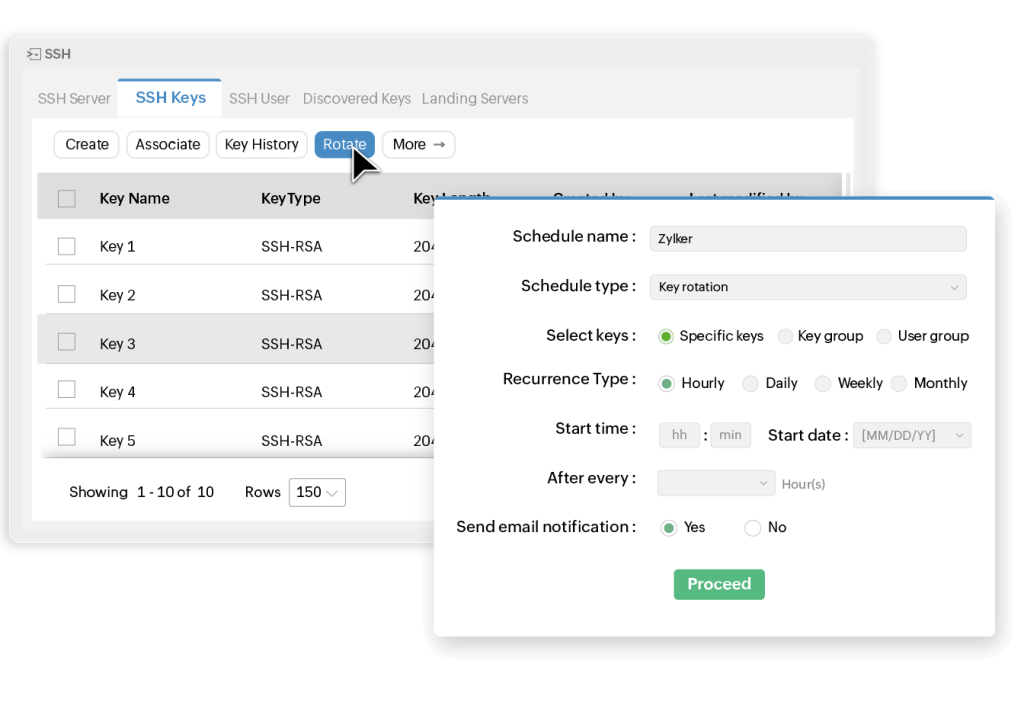
- Key Rotation: Security best practices mandate regular key rotation – replacing old keys with new ones. Performing this manually across a vast infrastructure is an enormous undertaking, often leading to neglected keys that become perpetual security risks.
- Revocation and Deactivation: When an employee leaves, or a project concludes, their access must be immediately revoked. Manually tracking and revoking keys across all systems is notoriously difficult, leaving behind stale keys that represent persistent backdoors.
- Auditing and Reporting: Gaining visibility into who has access to what, when, and from where, is crucial for security and compliance. Manual auditing involves sifting through logs and configurations, a process that is often incomplete, inaccurate, and incredibly inefficient.
Escalating Security Risks
The most significant drawback of manual SSH key management is the exponential increase in security risks.
- Untracked Access: Without a centralized system, organizations often lose track of which users possess which keys, leading to uncontrolled and untraceable access to critical systems. This lack of visibility is a prime target for insider threats.
- Compromised Private Keys: If a private key is compromised, perhaps due to weak storage practices or theft, it can grant an attacker unfettered access to all systems where the corresponding public key is authorized. Manual systems lack the agility to detect and respond to such compromises swiftly.
- Orphaned Keys: Keys belonging to former employees or decommissioned systems often remain active, creating orphaned keys that are never rotated or revoked. These become forgotten entry points that can be exploited years later.
- Lack of Policy Enforcement: Manual processes make it nearly impossible to consistently enforce security policies, such as key strength requirements, usage restrictions, or multi-factor authentication for key access. This leads to a fragmented and inconsistent security posture.
Compliance Nightmares and Audit Failures
In today’s regulatory landscape, organizations are held to stringent standards regarding access control and data security.
- Regulatory Scrutiny: Frameworks like GDPR, HIPAA, PCI DSS, SOC 2, and NIST mandate robust identity and access management (IAM) practices, including secure credential management. Manual SSH key management invariably falls short of these requirements.
- Audit Failures: During security audits, organizations must demonstrate comprehensive control over who can access what. The inability to provide clear, auditable logs of key lifecycles, access grants, and revocations can lead to hefty fines, reputational damage, and loss of business.
- Non-Repudiation Issues: Without a clear audit trail, it becomes impossible to definitively prove who performed an action, undermining the principle of non-repudiation and complicating incident response.
The collective weight of these challenges underscores a clear imperative: the traditional, manual approach to SSH key management is fundamentally broken and unsustainable in the face of modern IT complexities and cyber threats.
Demystifying Automated SSH Key Management Tools
An automated SSH key management tool is a specialized software solution designed to centralize, streamline, and secure the entire lifecycle of SSH keys across an organization’s infrastructure. It acts as a single pane of glass, providing comprehensive control and visibility over all SSH-based access. At its core, such a tool aims to eliminate the human element from repetitive, error-prone key management tasks, thereby enhancing both security and operational efficiency.
Core Functionalities and Purpose
The primary purpose of an automated SSH key management tool is to bring order, control, and intelligence to what is often a chaotic and vulnerable aspect of privileged access management (PAM). It achieves this by automating key processes, enforcing policies, and providing an immutable audit trail.
- Centralized Repository: These tools establish a secure, centralized repository for all SSH keys, both public and private. This eliminates the scattergun approach of keys stored on individual machines or in disparate, unsecured locations.
- Lifecycle Automation: From creation to rotation to revocation, the tool automates the entire key lifecycle management process, ensuring keys are always current, strong, and appropriately provisioned.
- Policy-Driven Enforcement: Organizations can define granular policies for key usage, strength, rotation frequency, and access permissions. The tool then automatically enforces these policies across the entire environment.
- Enhanced Security: By automating tasks and centralizing control, the attack surface related to SSH key management is drastically reduced. It mitigates risks from human error, forgotten keys, and unauthorized access.
- Auditability and Compliance: Every action related to an SSH key – its creation, distribution, usage, and revocation – is logged and auditable, providing irrefutable evidence for compliance requirements and forensic investigations.
How Automated Tools Work (High-Level Overview)
While specific implementations vary, most automated SSH key management tools operate on a set of common principles:
1. Discovery and Inventory: The tool first scans the network to discover all existing SSH keys on servers, endpoints, and applications, building a comprehensive inventory.
2. Secure Key Vault: It establishes a highly secure, often hardware-backed (e.g., HSM-integrated) vault to store private keys. Access to this vault is tightly controlled and often requires multi-factor authentication.
3. Agent-Based or Agentless Deployment: Some tools deploy lightweight agents on target systems to manage public key distribution and enforce policies. Others operate agentlessly, using existing SSH protocols to manage keys.
4. Policy Engine: A powerful policy engine allows administrators to define rules for key generation, rotation schedules, access permissions (e.g., which user can use which key to access which server), and more.
5. Automated Actions: Based on defined policies, the tool automatically performs actions like:
- Injecting public keys onto authorized servers.
- Rotating private and public keys at specified intervals.
- Revoking access when an employee leaves or a key is compromised.
- Monitoring key usage for anomalies.
6. Reporting and Alerting: Comprehensive dashboards and reports provide real-time visibility into the status of all keys, access patterns, and compliance posture. Alerts are triggered for policy violations or suspicious activities.
By abstracting away the manual complexities, these tools transform a high-risk, high-effort task into a secure, efficient, and compliant automated process, allowing IT and security teams to focus on strategic initiatives rather than reactive firefighting.
Core Functionalities: What an Automated Tool Delivers
A robust automated SSH key management tool offers a comprehensive suite of functionalities designed to cover every aspect of the key lifecycle management. These features collectively ensure that SSH access is secure, controlled, and auditable.
Discovery and Inventory
One of the foundational capabilities is the ability to automatically discover and inventory all existing SSH keys across an organization’s entire infrastructure. This includes servers, network devices, cloud instances, and user workstations.
- Comprehensive Scanning: Tools scan for public keys on authorized_keys files and identify private keys stored on user machines or in configuration files.
- Metadata Collection: Beyond just identifying keys, the tool collects crucial metadata such as key owner, creation date, last used date, associated systems, and key strength.
- Risk Assessment: It can identify weak keys, duplicate keys, orphaned keys, and keys that violate organizational policies, providing a clear picture of the current security posture.
Key Generation and Provisioning
Secure generation and controlled provisioning are critical to preventing vulnerabilities from the outset.
- Secure Key Generation: The tool generates strong, cryptographically secure SSH key pairs (e.g., RSA 4096-bit, Ed25519) that adhere to organizational standards.
- Automated Distribution: It automates the secure distribution of public keys to target systems (e.g., injecting them into authorized_keys files) and manages the secure storage and controlled access to private keys in a central vault.
- Just-in-Time Provisioning: Some advanced tools offer just-in-time (JIT) provisioning, where access is granted only for a specific, limited duration when needed, further minimizing the window of vulnerability.
Automated Key Rotation
Regular key rotation is a fundamental security practice, significantly reducing the risk associated with a potentially compromised key.
- Scheduled Rotation: The tool enforces predefined rotation schedules (e.g., every 90 days) for all keys.
- Seamless Replacement: It automatically replaces old keys with new ones on all relevant systems without interrupting ongoing operations, ensuring continuous secure access.
- Grace Periods: Often, a grace period is provided during rotation where both old and new keys are valid, allowing for a smooth transition before the old key is fully deprecated.
Revocation and Deactivation
Prompt and complete key revocation is paramount when access is no longer required or a key is compromised.
- Instant Revocation: The tool allows for immediate deactivation and removal of public keys from all authorized systems with a single command or policy trigger.
- User Offboarding Automation: Integrates with identity and access management (IAM) systems to automatically revoke all associated SSH keys when a user’s account is deactivated.
- Compromise Response: In the event of a suspected private key compromise, the tool can instantly revoke the compromised key and issue new ones, mitigating potential damage.
Auditing and Reporting
Comprehensive auditing and reporting capabilities provide the necessary visibility and accountability.
- Immutable Audit Trails: Every action related to an SSH key – its creation, modification, usage, and deletion – is logged in an immutable audit trail.
- Granular Reporting: Tools generate detailed reports on key inventory, key status, compliance adherence, access patterns, and potential security risks.
- Alerting: Configurable alerts notify administrators of policy violations, suspicious access attempts, or keys nearing their expiration/rotation date.
Policy Enforcement
The ability to define and enforce granular security policies is central to an automated SSH key management tool.
- Key Strength Policies: Enforcing minimum key lengths and approved cryptographic algorithms.
- Access Policies: Defining which users can access which systems with which keys, and under what conditions (e.g., time-based access, source IP restrictions).
- Usage Policies: Restricting the use of certain keys for specific purposes or disallowing direct root access via SSH keys.
- Compliance Policies: Mapping key management practices directly to regulatory requirements.
Access Control and Privileged Session Management
Advanced tools integrate with privileged access management (PAM) solutions to enhance access control.
- Role-Based Access Control (RBAC): Assigning key management permissions based on user roles (e.g., security admin, system admin, auditor).
- Multi-Factor Authentication (MFA): Requiring MFA for accessing the private keys stored in the vault or for initiating SSH sessions.
- Session Recording: Some tools offer the ability to record SSH sessions, providing an invaluable resource for auditing, incident response, and training.
Integration Capabilities
Seamless integration with existing enterprise systems is crucial for a cohesive security ecosystem.
- Identity and Access Management (IAM): Integrating with directories like Active Directory or LDAP for user authentication and authorization.
- Security Information and Event Management (SIEM): Sending audit logs and alerts to SIEM systems for centralized security monitoring and correlation.
- DevOps Tools: Integrating with configuration management tools (Ansible, Chef, Puppet), CI/CD pipelines (Jenkins, GitLab CI), and orchestration platforms (Kubernetes) to embed secure key practices into automated workflows.
- Cloud Providers: Managing keys for instances across AWS, Azure, GCP, and other cloud environments.
By providing these robust functionalities, automated SSH key management tools elevate the security and manageability of SSH access to an enterprise-grade standard, transforming a potential vulnerability into a controlled and auditable asset.
Transformative Benefits: Beyond Enhanced Security
While enhanced security is the most immediate and evident advantage of deploying an automated SSH key management tool, the benefits extend far beyond simply locking down access. These tools deliver a multifaceted return on investment, impacting operational efficiency, compliance posture, scalability, and even an organization’s financial health.
Fortified Security Posture
The fundamental promise of an automated SSH key management tool is a significantly stronger security posture.
- Reduced Attack Surface: By eliminating unmanaged, weak, or forgotten keys, the number of potential entry points for attackers is drastically reduced.
- Mitigation of Insider Threats: Centralized control, granular permissions, and comprehensive auditing make it much harder for malicious insiders to gain unauthorized access or for legitimate users to abuse their privileges without detection.
- Rapid Incident Response: In the event of a private key compromise, the ability to instantly revoke access across the entire infrastructure minimizes the damage window and facilitates a swift, decisive response.
- Enforced Best Practices: Automation ensures that all keys adhere to strong cryptographic standards, are regularly rotated, and are only used by authorized individuals, eliminating the inconsistencies inherent in manual processes.
Streamlined Operations and Reduced Administrative Burden
The efficiency gains from automation are substantial, freeing up valuable IT and security resources.
- Automated Key Lifecycle: Tasks such as key generation, distribution, rotation, and revocation, which previously consumed significant administrator time, are now handled automatically. This translates into hundreds, if not thousands, of saved man-hours annually.
- Faster Provisioning: Onboarding new users or provisioning new servers becomes a matter of policy application rather than manual configuration, accelerating time-to-deployment.
- Error Reduction: Automation virtually eliminates human error, which is a common cause of security vulnerabilities and operational outages in manual key management.
- Simplified Troubleshooting: With a centralized view and detailed logs, identifying and resolving access issues becomes much faster and more accurate.
Achieving and Maintaining Regulatory Compliance
For organizations operating under strict regulatory frameworks, an automated SSH key management tool is an invaluable asset.
- Demonstrable Control: The tools provide verifiable evidence of robust access control, credential management, and audit trails, satisfying requirements from GDPR, HIPAA, PCI DSS, SOC 2, NIST, and other standards.
- Audit Readiness: Generating comprehensive, immutable reports on key lifecycles, access attempts, and policy adherence makes organizations perpetually ready for internal and external audits, reducing preparation time and stress.
- Non-Repudiation: Detailed logging ensures that every access event is attributable to a specific user, providing clear non-repudiation and enhancing accountability.
Scalability and Agility for Dynamic Environments
Modern IT environments are characterized by rapid scaling, ephemeral resources, and hybrid cloud deployments.
- Effortless Expansion: As an organization grows its infrastructure, adds new users, or expands into new cloud regions, the automated SSH key management tool scales seamlessly, managing an increasing volume of keys without additional manual overhead.
- Cloud-Native Integration: These tools are designed to integrate with cloud environments, managing keys for dynamic instances, containers, and serverless functions, ensuring consistent security across heterogeneous landscapes.
- DevOps Enablement: By integrating with DevOps pipelines, secure key management becomes an intrinsic part of automated deployment workflows, supporting agility without compromising security.
Cost Efficiency
The benefits of an automated SSH key management tool ultimately translate into significant cost savings.
- Reduced Labor Costs: Automating labor-intensive tasks frees up highly paid IT and security professionals to focus on higher-value strategic initiatives.
- Avoided Breach Costs: By significantly reducing the likelihood and impact of SSH key-related breaches, organizations can avoid the astronomical costs associated with data breaches, including legal fees, regulatory fines, reputational damage, and business disruption.
- Streamlined Audits: Faster and more efficient audit processes reduce the time and resources spent on compliance activities.
- Improved Uptime: Enhanced security and reduced errors contribute to greater system stability and uptime, preventing costly outages.
In essence, an automated SSH key management tool is an investment that pays dividends across multiple facets of an organization, transforming a historically challenging and risky domain into a well-governed, secure, and efficient operation.
Strategic Implementation: Adopting an Automated Solution
Implementing an automated SSH key management tool is a strategic undertaking that requires careful planning, a phased approach, and strong organizational buy-in. It’s not merely a technical deployment but a shift in an organization’s approach to privileged access management and infrastructure security.
Assessment and Planning
Before selecting a tool, a thorough understanding of the current state is crucial.
- Inventory Existing Keys: Conduct an initial audit to identify all existing SSH keys, their owners, associated systems, and usage patterns. This will highlight the scale of the problem.
- Define Requirements: Clearly articulate the organization’s specific needs, including security policies, compliance mandates, integration requirements (e.g., with IAM, SIEM, DevOps tools), scalability needs, and budget constraints.
- Identify Stakeholders: Engage all relevant teams – security, operations, development, compliance – to gather input and ensure broad support for the initiative.
- Risk Analysis: Prioritize which keys and systems pose the highest risk under current manual management to guide the initial phases of deployment.
Tool Selection
Choosing the right automated SSH key management tool is critical for long-term success.
- Feature Alignment: Ensure the tool’s core functionalities align with the defined requirements, covering discovery, generation, rotation, revocation, auditing, and policy enforcement.
- Integration Ecosystem: Evaluate its ability to integrate seamlessly with existing identity and access management (IAM), privileged access management (PAM), security information and event management (SIEM), and DevOps tools.
- Scalability and Performance: Verify that the tool can handle the current and projected scale of the organization’s infrastructure and key volume without performance degradation.
- Security Features: Assess the tool’s own security, including its key vault protection (e.g., FIPS 140-2 certification, HSM integration), access controls, and logging capabilities.
- Vendor Reputation and Support: Consider the vendor’s track record, customer support, and commitment to ongoing development and security updates.
- Cost-Benefit Analysis: Evaluate the total cost of ownership (TCO) against the anticipated benefits, including license fees, implementation costs, and ongoing maintenance.
Phased Deployment
A “big bang” approach to implementation is rarely successful. A phased rollout minimizes disruption and allows for lessons learned.
- Pilot Program: Start with a small, non-critical environment or a specific team to test the tool, validate configurations, and gather initial feedback.
- Gradual Rollout: Expand the deployment incrementally, targeting specific departments, applications, or environments based on risk priority or ease of integration.
- Migration Strategy: Develop a clear plan for migrating existing SSH keys into the automated system, which might involve importing existing keys or generating new ones and rotating them in.
Integration with Existing Infrastructure
Seamless integration is key to maximizing the value of the tool.
- IAM Integration: Connect with Active Directory, LDAP, or other IAM systems to leverage existing user identities and groups for access control.
- SIEM Integration: Configure the tool to send all audit logs and alerts to the central SIEM system for consolidated security monitoring.
- DevOps Workflow Integration: Work with development and operations teams to embed key management processes directly into CI/CD pipelines, configuration management tools, and orchestration platforms.
- Cloud Provider Integration: Ensure the tool can manage keys for instances and services across all utilized cloud platforms.
Training and Documentation
User adoption is paramount.
- Comprehensive Training: Provide thorough training for administrators, security teams, and even end-users on how to interact with the new system, including generating new keys, requesting access, and understanding new policies.
- Clear Documentation: Create accessible and up-to-date documentation covering installation, configuration, operational procedures, troubleshooting guides, and policy definitions.
- Change Management: Communicate the benefits and changes clearly to all stakeholders, addressing concerns and demonstrating how the new system improves security and efficiency.
By following a structured and thoughtful implementation strategy, organizations can successfully deploy an automated SSH key management tool, transforming their approach to privileged access and significantly bolstering their overall cybersecurity posture.
Navigating the Landscape: Challenges and Best Practices
While the benefits of an automated SSH key management tool are compelling, their implementation and ongoing management are not without challenges. Understanding these hurdles and adopting best practices can ensure a successful and sustainable deployment.
Common Challenges
- Integration Complexities: Integrating a new SSH key management tool with diverse existing infrastructure, including legacy systems, various operating systems, and a multitude of applications, can be complex and time-consuming. Disparate systems may not have standardized APIs or may require custom connectors.
- User Adoption and Resistance to Change: Users, particularly developers and system administrators, may be accustomed to their existing (often less secure) methods of managing keys. Introducing new tools and processes can be met with resistance, especially if perceived as adding friction to their workflows.
- Maintaining Policy Consistency Across Diverse Environments: Organizations often operate in hybrid or multi-cloud environments, with on-premises data centers, private clouds, and public cloud providers. Ensuring consistent application and enforcement of SSH key policies across all these varied landscapes can be a significant challenge.
- Vendor Lock-in Concerns: Investing heavily in a proprietary automated SSH key management tool can lead to vendor lock-in, making it difficult and costly to switch to another solution in the future.
- Resource Allocation: Implementing and maintaining these tools requires dedicated resources, including skilled personnel for deployment, configuration, and ongoing monitoring. Organizations may underestimate the initial investment in terms of time and expertise.
- Security of the Tool Itself: The SSH key management tool becomes a critical component of the security infrastructure. If the tool itself is compromised, it could provide an attacker with control over all managed SSH keys. Securing the tool with strong access controls, multi-factor authentication (MFA), and regular audits is paramount.
Best Practices for Sustainable SSH Key Management
To overcome these challenges and maximize the value of an automated solution, organizations should adhere to several best practices:
- Implement Strong, Granular Policies: Define clear, enforceable policies for key generation, strength, rotation frequency, and access permissions. Leverage Role-Based Access Control (RBAC) to ensure users only have access to keys and systems absolutely necessary for their role.
- Mandate Regular Key Rotation: Enforce automated, frequent key rotation for all SSH keys. This significantly limits the window of opportunity for attackers if a key is compromised.
- Enforce Multi-Factor Authentication (MFA): Require MFA for accessing the automated SSH key management tool itself and, ideally, for accessing private keys stored within it or for initiating SSH sessions.
- Integrate with Existing Security Ecosystem: Ensure seamless integration with IAM, PAM, SIEM, and DevOps tools. This creates a unified security posture, enhances visibility, and streamlines incident response.
- Conduct Regular Audits and Reviews: Regularly audit the SSH key inventory, review access policies, and analyze key usage logs. This helps identify dormant keys, policy violations, and potential security gaps.
- Educate and Train Users: Provide ongoing training for administrators and users on the new SSH key management processes, the importance of security, and how to properly use the automated tool. Address concerns and highlight the benefits to foster adoption.
- Secure the Key Management Tool Itself: Treat the automated SSH key management tool as a highly privileged system. Apply the highest security controls to it, including network segmentation, principle of least privilege, regular patching, and continuous monitoring. Consider hardware security modules (HSMs) for storing the tool’s master keys.
- Implement Just-in-Time (JIT) Access: Where possible, move towards just-in-time provisioning of SSH access, granting credentials only for the duration of a specific task, further minimizing exposure.
- Monitor for Anomalous Activity: Continuously monitor SSH login attempts and key usage patterns for any deviations from baseline behavior, which could indicate a compromise or unauthorized activity.
- Plan for Disaster Recovery: Ensure that the automated SSH key management tool and its associated data are included in the organization’s disaster recovery and business continuity plans.
By proactively addressing potential challenges and embedding these best practices into the organizational culture and technical operations, enterprises can fully leverage the power of automated SSH key management tools to build a resilient, secure, and efficient digital infrastructure.
The Horizon: Future Trends in SSH Key Management
The landscape of cybersecurity is ever-evolving, and SSH key management is no exception. As threats become more sophisticated and IT environments grow more complex, the tools and strategies for securing privileged access will continue to advance. Several key trends are shaping the future of automated SSH key management.
Zero-Trust Architectures
The shift towards zero-trust security models is perhaps the most significant trend impacting SSH key management.
- Verify Explicitly: In a zero-trust model, no user or device is inherently trusted, regardless of their location on the network. Every access request, including those mediated by SSH keys, must be explicitly verified.
- Least Privilege Access: Automated SSH key management tools will increasingly integrate with zero-trust principles to enforce least privilege access dynamically, granting access only for the specific resources and duration required, and revoking it immediately afterward.
- Contextual Access: Future systems will leverage more contextual information (user identity, device posture, location, time of day, behavioral analytics) to make real-time access decisions for SSH sessions, further enhancing security beyond static key management.
AI and Machine Learning in Key Management
The application of Artificial Intelligence (AI) and Machine Learning (ML) holds immense promise for revolutionizing SSH key management.
- Anomaly Detection: AI/ML algorithms can analyze vast amounts of SSH access logs to identify anomalous behavior – unusual login times, access from new locations, or access to sensitive systems by users who don’t typically interact with them. This can flag potential compromises that would be missed by traditional rule-based systems.
- Predictive Analytics: ML can predict key expiration, potential policy violations, or even anticipate which keys might be at higher risk of compromise based on usage patterns and environmental factors.
- Automated Remediation: In the future, AI-powered tools might not only detect anomalies but also initiate automated remediation steps, such as temporary key revocation or requiring re-authentication, in response to high-confidence threats.
Post-Quantum Cryptography (PQC) Readiness
The advent of quantum computing poses a long-term, existential threat to current public-key cryptography, including the algorithms used in SSH keys.
- Quantum Threat: Quantum computers have the potential to break widely used cryptographic algorithms like RSA and ECC, rendering current SSH keys vulnerable.
- PQC Integration: Automated SSH key management tools will need to evolve to support post-quantum cryptography (PQC) algorithms as they become standardized. This involves managing and rotating keys based on these new, quantum-resistant algorithms.
- Hybrid Approaches: Initially, organizations may adopt hybrid approaches, using both classical and PQC algorithms concurrently to provide a transition period and hedge against future uncertainties.
Unified Credential Management
The trend towards consolidating various forms of digital credentials under a single management umbrella will continue.