Navigating the Digital Wild West: A Comprehensive Guide to Securing Public Wi-Fi with Free VPNs
In our hyper-connected world, the allure of public Wi-Fi is undeniable. From bustling coffee shops and airport lounges to hotel lobbies and libraries, free internet access has become an expected amenity, a lifeline for productivity and leisure alike. The convenience it offers is immense, allowing us to stay connected, work remotely, and stream content without depleting mobile data allowances. Yet, beneath this veneer of seamless connectivity lies a labyrinth of potential security vulnerabilities, transforming what seems like a harmless convenience into a veritable digital minefield. For the uninitiated, connecting to an unsecured public network is akin to shouting sensitive personal information into a crowded room, with no guarantee of who might be listening.
This comprehensive guide delves deep into the critical necessity of safeguarding your digital presence on public networks. We will explore the inherent dangers, demystify the technology that offers protection, and, most importantly, provide an actionable roadmap for securing your public Wi-Fi experience using a powerful yet often misunderstood tool: the Virtual Private Network (VPN). Specifically, we will focus on the often-debated realm of free VPN services, dissecting their utility, limitations, and how to choose and deploy them wisely as a crucial first line of defense in the ever-evolving landscape of cyber threats.
The Siren Song of Public Wi-Fi: Convenience vs. Cryptic Risks
The ubiquity of public Wi-Fi hotspots has fundamentally reshaped how we interact with the internet. Imagine being able to send an urgent work email from a park bench, stream your favorite show during a layover, or quickly check your bank balance while waiting for an appointment. These scenarios highlight the unparalleled convenience. However, this ease of access comes at a significant, often invisible, cost to your digital security and data privacy.
Most public Wi-Fi networks lack robust encryption protocols, meaning the data traveling between your device and the internet is transmitted in plain text. This makes it astonishingly easy for cybercriminals, often lurking on the same network, to intercept and read your communications. Think of it as sending a postcard rather than a sealed letter – anyone can read its contents.
Understanding the Spectrum of Cyber Threats on Open Networks
The risks associated with unsecured public Wi-Fi are diverse and sophisticated. Being aware of these threats is the first step towards effective protection:
- Man-in-the-Middle (MITM) Attacks: This is perhaps the most common and dangerous threat. A cybercriminal positions themselves between your device and the Wi-Fi hotspot, intercepting all your communications. They can then eavesdrop on your activities, steal login credentials, or even inject malware into your device. You might think you’re communicating directly with a legitimate website, but you’re actually talking to the attacker.
- Data Sniffing and Eavesdropping: Without encryption, your data packets are like open books. Tools readily available to malicious actors allow them to “sniff” or intercept data packets, revealing sensitive information such as usernames, passwords, credit card numbers, and browsing history.
- Malware Distribution: Some attackers set up fake Wi-Fi hotspots (often with legitimate-sounding names like “Free Airport Wi-Fi”) to lure unsuspecting users. Once connected, they can redirect you to malicious websites or even push malware directly onto your device.
- Rogue Wi-Fi Hotspots: Similar to malware distribution points, these are malicious access points designed to mimic legitimate ones. They might have a slightly altered name (e.g., “Starbucks_Free_WlFl” instead of “Starbucks_Free_WiFi”). Connecting to these gives attackers full control over your internet traffic.
- Session Hijacking: Attackers can steal your session cookies, which are small pieces of data that keep you logged into websites. With these cookies, they can impersonate you and access your online accounts without needing your password.
- Unencrypted Websites: Even if you’re on a “secure” public Wi-Fi, if the website you’re visiting doesn’t use HTTPS (indicated by a padlock icon in your browser’s address bar), your connection to that specific site is still vulnerable.
The cumulative effect of these vulnerabilities is a profound erosion of your online safety and digital privacy. This is where the concept of a Virtual Private Network steps in as an indispensable guardian.
VPNs Unveiled: Your Indispensable Digital Shield
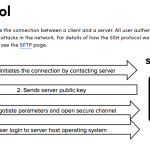
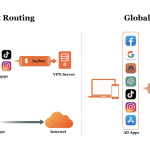
A Virtual Private Network (VPN) acts as your personal digital bodyguard, creating a secure, encrypted tunnel between your device and the internet. Instead of directly connecting to a website via your public Wi-Fi, your internet traffic first travels through this encrypted tunnel to a VPN server. From there, it exits onto the public internet, appearing as if it originated from the VPN server’s location and IP address, not yours.
How a VPN Works Its Magic: Encryption and Anonymity
The core mechanisms of a VPN are relatively straightforward, yet incredibly effective:
- Encryption: When you connect to a VPN, all your internet traffic is immediately encrypted. This means your data is scrambled into an unreadable format before it leaves your device. Even if a cybercriminal intercepts your data on a public Wi-Fi network, they will only see gibberish – an unintelligible stream of encrypted characters. The most common and robust encryption standard used by reputable VPNs is AES-256, often referred to as “military-grade” encryption.
- Secure Tunneling: The encrypted data travels through a “tunnel” to a VPN server. This tunnel is a secure, private connection over the public internet.
- IP Address Masking: When your data exits the VPN server, it takes on the IP address of that server. This effectively masks your real IP address, making it difficult for websites, advertisers, and even your internet service provider (ISP) to track your online activities back to your physical location or device. This enhances your online anonymity.
- Bypassing Censorship and Geo-Restrictions (Secondary Benefit): While not the primary focus for public Wi-Fi security, the ability of a VPN to make it appear as if you’re browsing from a different geographical location can also be beneficial for accessing content or services restricted in your actual region.
For individuals relying on public Wi-Fi, a VPN transforms an inherently insecure connection into a reasonably secure one. It’s an essential tool for maintaining data protection and preventing identity theft when you’re away from the safety of your home network.
The Double-Edged Sword: The Appeal and Caveats of Free VPNs
Given the clear benefits of a VPN, the idea of getting this protection for free is understandably appealing. Many users, especially those on a budget or who only occasionally use public Wi-Fi, gravitate towards free VPN services. However, it’s crucial to approach these offerings with a discerning eye, understanding that “free” often comes with hidden costs or significant limitations.
Why Free VPNs Are Popular (and Why They Can Be Problematic)
The primary draw of free VPNs is obvious: no monetary cost. This makes them accessible to everyone. They can offer a basic level of encryption and IP masking, providing a significant upgrade in security compared to using public Wi-Fi without any protection at all.
However, running a VPN service requires substantial infrastructure, maintenance, and bandwidth – all of which cost money. If you’re not paying with currency, you’re often paying in other ways. These “costs” can manifest as:
- Data Logging and Sale: Some free VPNs generate revenue by logging your browsing activity and selling this data to third-party advertisers or data brokers. This directly contradicts the core purpose of a VPN, which is to enhance privacy. A robust “no-logs policy” is paramount.
- Slower Speeds and Bandwidth Throttling: Free services typically offer limited bandwidth and deliberately throttle connection speeds to encourage users to upgrade to their paid tiers. This can make browsing, streaming, or downloading frustratingly slow.
- Limited Server Locations: You’ll likely have access to only a handful of server locations, which can impact performance and limit your ability to bypass geo-restrictions if that were a secondary goal.
- Data Caps: Many free VPNs impose strict daily or monthly data limits (e.g., 500MB or 1GB). This might be sufficient for light browsing and email, but it’s quickly exhausted with streaming or frequent use.
- Intrusive Advertisements: To generate revenue, some free VPNs inject ads into your browsing experience, which can be annoying and potentially compromise your security if those ads are malicious.
- Weaker Encryption or Protocols: While most reputable free VPNs use AES-256, some less scrupulous ones might use older, weaker encryption protocols, rendering your data less secure.
- Malware and Spyware: The most dangerous free VPNs are those that are outright malicious, designed to inject malware onto your device or act as spyware to harvest your data directly.
The key takeaway is that not all free VPNs are created equal. While some are legitimate services offering a limited free tier to attract users to their premium plans, others are best avoided entirely. The challenge lies in distinguishing between the two.
Step-by-Step Guide: Securing Public Wi-Fi with a Reputable Free VPN
Despite the caveats, a well-chosen free VPN can be an invaluable tool for securing your public Wi-Fi connection. Here’s how to navigate the process:
Step 1: Research and Select a Reputable Free VPN Provider
This is the most critical step. Do not simply download the first “free VPN” app you find. Look for providers that also offer a paid service, as their free tier is often a demonstration of their premium product. Key criteria for selection include:
- Transparent No-Logs Policy: The provider should explicitly state that they do not log your online activities, connection timestamps, or IP addresses. This is fundamental to privacy.
- Strong Encryption: Ensure they use industry-standard encryption like AES-256.
- Clear Privacy Policy: Read their privacy policy carefully. Does it clearly explain what data they collect (even non-identifiable data) and why?
- Positive Reviews and Reputation: Check independent reviews from cybersecurity experts and tech publications. Avoid services with a history of data breaches or privacy scandals.
- Reasonable Limitations: Accept that a free tier will have limitations (data caps, fewer servers, speed limits). The goal is to find one whose limitations you can live with for basic public Wi-Fi protection.
Examples of generally well-regarded free VPN tiers (with their typical limitations):
- Proton VPN Free: Offers unlimited data, strong encryption, and a strict no-logs policy. Limitations include access to only 3 server locations (US, Netherlands, Japan) and slower speeds compared to premium.
- Windscribe Free: Provides 10GB of free data per month (more if you tweet about them), access to servers in 10+ countries, and a good privacy policy.
- TunnelBear Free: Offers 500MB of free data per month (with options to earn more), a user-friendly interface, and a strong commitment to privacy.
Step 2: Download and Install the VPN Application
Once you’ve chosen a provider, download their official application. Always download directly from the provider’s official website or through legitimate app stores (Google Play Store, Apple App Store). Avoid third-party download sites, as these could host compromised versions of the software.
Step 3: Create an Account (if Required)
Some free VPNs require you to create an account. Use a strong, unique password for this account. If possible, avoid using your primary email address, or use an alias if the service allows.
Step 4: Connect to a VPN Server
Open the VPN application. You’ll typically see an option to connect. Most free tiers will automatically select the “best” or closest available server. If you have a choice, select a server that is geographically close to your current location for the best possible speeds. Ensure the app indicates a “Connected” status before proceeding with any online activities.
Step 5: Verify Your Connection (Optional but Recommended)
To confirm your VPN is working correctly, you can:
- Check Your IP Address: Before connecting to the VPN, visit a website like “whatismyip.com” to note your public IP address. After connecting to the VPN, visit it again. Your displayed IP address should be different and correspond to the VPN server’s location.
- Perform a DNS Leak Test: Websites like “dnsleaktest.com” can check if your DNS requests are leaking outside the VPN tunnel, potentially revealing your real ISP and location. A properly functioning VPN should prevent DNS leaks.
Step 6: Practice Secure Browsing Habits (VPN or Not)
Even with a VPN, good digital hygiene is paramount. Always:
- Look for HTTPS: Ensure websites you visit use HTTPS encryption (indicated by a padlock icon in the browser address bar). This encrypts the connection between your browser and the website, adding another layer of security.
- Avoid Sensitive Transactions: If possible, refrain from accessing banking, shopping, or other highly sensitive accounts on public Wi-Fi, even with a VPN, unless absolutely necessary. If you must, ensure the website uses HTTPS and consider using your mobile data instead.
- Disable Auto-Connect: Configure your device to ask before connecting to new Wi-Fi networks, rather than automatically joining.
- Use Strong, Unique Passwords: For all your online accounts.
Beyond the VPN: Additional Layers of Protection for Public Networks
While a VPN is a cornerstone of public Wi-Fi security, it’s part of a broader ecosystem of online safety measures. Combining a VPN with these additional practices creates a formidable defense:
- Keep Your Software Updated: Regularly update your operating system, web browsers, and all applications. Updates often include critical security patches that protect against known vulnerabilities.
- Activate Your Firewall: Ensure your device’s built-in firewall is enabled. A firewall monitors incoming and outgoing network traffic and blocks unauthorized access attempts.
- Install Antivirus/Antimalware Software: A reputable antivirus program can detect and remove malicious software that might try to infect your device, even if it bypasses your VPN.
- Use Two-Factor Authentication (2FA): Enable 2FA on all critical online accounts (email, banking, social media). This adds an extra layer of security, requiring a second verification step (like a code from your phone) in addition to your password.
- Disable File Sharing: Turn off file and printer sharing options when connected to public networks. This prevents unauthorized access to your files from other devices on the same network.
- Use a Secure Browser: Consider browsers known for their privacy features, like Brave or Firefox, and use privacy-enhancing extensions (e.g., HTTPS Everywhere, uBlock Origin).
- Avoid Public Wi-Fi for Highly Sensitive Tasks: For tasks like online banking, medical portals, or major financial transactions, it’s always safer to use your mobile data hotspot (which uses a more secure cellular connection) or wait until you’re on a trusted home network.
Real-World Scenarios and Best Practices for Public Network Protection
Let’s consider how these principles apply in everyday situations:
- Coffee Shops and Cafes: These are notorious for casual browsing. Always connect your VPN before checking emails or accessing social media. Avoid entering credit card details for online purchases if possible.
- Airports and Train Stations: With long wait times, people often engage in more extensive online activity. The risk of sophisticated attackers is higher here. A VPN is non-negotiable. Be wary of official-sounding Wi-Fi names; always confirm with staff if unsure.
- Hotels: Hotel Wi-Fi can be surprisingly insecure. Assume anything you do without a VPN is visible to others on the network, including potentially hotel staff or other guests with malicious intent.
- Libraries and Public Spaces: While generally safer due to oversight, the basic principle of open networks still applies. Use your VPN.
What to do if you suspect a breach: If you notice unusual activity on your accounts, receive suspicious emails, or your device behaves erratically after using public Wi-Fi, immediately change all your passwords, run a full antivirus scan, and monitor your financial accounts for unauthorized transactions.
The balance between convenience and security is a personal one, but when it comes to public Wi-Fi, leaning heavily towards security is always the wiser choice. A free VPN, when chosen carefully, provides a robust baseline for this security.
Limitations and Misconceptions about Free VPNs
It’s vital to maintain realistic expectations about what a free VPN can and cannot do:
- Not a Magic Bullet for Anonymity: While a VPN masks your IP address, it doesn’t make you completely anonymous. Your digital footprint can still be traced through other means, such as browser fingerprinting, cookies, or your online habits.
- Data Caps and Speed Limitations are Real: Don’t expect to stream 4K video or download large files consistently on a free VPN. They are primarily designed for basic browsing and email.
- “Free” Still Has a Cost: If the service isn’t transparent about its revenue model, assume your data is being used in some way. Always prioritize providers with clear privacy policies.
- Limited Features: Free VPNs typically lack advanced features like split tunneling, kill switches (which disconnect your internet if the VPN drops), or dedicated IP addresses, which are often found in paid versions.
The Inevitable Question: When to Upgrade to a Paid VPN?
While free VPNs offer a valuable entry point into public network protection, they are often a compromise. For users who demand more robust security, greater performance, and a wider range of features, upgrading to a paid VPN service becomes an essential consideration.
You should consider a paid VPN if you:
- Need Unlimited Data and Bandwidth: For frequent streaming, large downloads, or continuous use.
- Require Faster Speeds: Paid VPNs typically offer optimized servers and less congestion.
- Desire More Server Locations: For better performance and wider access to geo-restricted content.
- Value Stronger Privacy Guarantees: Reputable paid VPNs often have audited no-logs policies and are based in privacy-friendly jurisdictions.
- Need Advanced Security Features: Such as a kill switch, split tunneling, or dedicated IP addresses.
- Expect Dedicated Customer Support: Paid services offer responsive support for troubleshooting.
- Use a VPN Extensively: If VPN use is a daily necessity rather than an occasional safeguard.
Even an affordable paid VPN often provides a significantly superior experience in terms of speed, reliability, and privacy compared to its free counterparts. Think of the free version as a trial or a basic emergency kit, while a paid subscription is a full-fledged, professionally maintained security apparatus.
Conclusion: Empowering Your Digital Journey on Public Wi-Fi
The convenience of public Wi-Fi is a modern amenity we can hardly do without. However, the inherent risks associated with unsecured networks demand a proactive and informed approach to internet security. Understanding the threats, from Man-in-the-Middle attacks to data sniffing, is the first step toward safeguarding your digital life.
A carefully chosen, reputable free VPN serves as an indispensable first line of defense, encrypting your data and masking your IP address, thereby transforming a risky public connection into a much safer one. By following the steps outlined in this guide – from meticulous research and selection to diligent application and verification – you can significantly enhance your online safety without incurring direct financial cost.
Remember, a VPN is a powerful tool, but it’s not a panacea. Combining its protective capabilities with robust secure browsing habits, up-to-date software, and additional security layers like firewalls and 2FA creates a comprehensive shield. As you navigate the digital wild west of public Wi-Fi, let vigilance be your compass and a well-chosen free VPN your trusted digital armor. Stay connected, stay productive, and most importantly, stay secure.
Frequently Asked Questions (Q&A) about Securing Public Wi-Fi with Free VPNs
Q1: Is it really necessary to use a VPN on public Wi-Fi?
A1: Absolutely. Public Wi-Fi networks are often unsecured, meaning your data is transmitted in plain text. This makes you highly vulnerable to cyber threats like data sniffing, Man-in-the-Middle attacks, and identity theft. A VPN encrypts your data, creating a secure tunnel that protects your information from prying eyes, making it an essential layer of public Wi-Fi security.
Q2: What are the main risks of using an unsecured public Wi-Fi network?
A2: The main risks include Man-in-the-Middle (MITM) attacks where attackers intercept your data, data sniffing to steal personal information (passwords, credit card numbers), malware injection, rogue Wi-Fi hotspots designed to trick users, and session hijacking where attackers gain access to your online accounts. These cyber threats can lead to severe privacy breaches and financial losses.
Q3: Are all free VPNs safe to use?
A3: No, definitely not. While some free VPNs from reputable providers offer a legitimate, albeit limited, service, many others can be dangerous. Some free VPNs log and sell your data, inject ads, have weak encryption, or even contain malware. It’s crucial to research thoroughly and choose a free VPN with a strong reputation, a clear no-logs policy, and transparent privacy practices to ensure online safety.
Q4: How does a VPN actually protect my data on public Wi-Fi?
A4: A VPN protects your data in two primary ways: encryption and IP address masking. When you connect to a VPN, all your internet traffic is encrypted (scrambled) before it leaves your device, making it unreadable to anyone who intercepts it. Your data then travels through a secure tunnel to a VPN server, which masks your real IP address with its own, enhancing your online anonymity and preventing tracking.
Q5: What should I look for when choosing a reputable free VPN?
A5: Look for a free VPN from a provider that also offers a paid service, as their free tier is usually a demonstration of their quality. Key factors include a strict no-logs policy, strong encryption (preferably AES-256), a transparent and easy-to-understand privacy policy, positive reviews from cybersecurity experts, and reasonable limitations (e.g., data caps, fewer server locations) that you can accept for basic use.
Q6: Can a free VPN bypass all geo-restrictions and censorship?
A6: Not reliably. While a VPN can mask your location, free VPNs typically offer a very limited number of server locations. This might not be sufficient to access specific geo-restricted content. Additionally, their speed and data caps can make streaming or downloading content from other regions impractical. For consistent geo-unblocking, a paid VPN is usually necessary.
Q7: What are the common limitations of free VPN services?
A7: Common limitations include data caps (e.g., 500MB or 1GB per month), slower connection speeds due to bandwidth throttling or server congestion, a limited number of server locations, intrusive advertisements, and often a lack of advanced features like a kill switch or split tunneling. These limitations are designed to encourage users to upgrade to a paid plan.
Q8: Should I use a free VPN for sensitive activities like online banking?
A8: It’s generally recommended to avoid highly sensitive activities like online banking or making major financial transactions on public Wi-Fi, even with a free VPN. While a reputable free VPN provides a layer of encryption, the potential for data logging or other compromises with free services means it’s safer to use your mobile data hotspot (which is inherently more secure) or wait until you’re on a trusted, private network for such critical tasks.
Q9: Besides a VPN, what other measures can I take to secure my device on public Wi-Fi?
A9: Complementing a VPN with other digital security practices is crucial. These include keeping your operating system and apps updated, enabling your device’s firewall, using strong antivirus/antimalware software, enabling Two-Factor Authentication (2FA) on all accounts, disabling file sharing, always checking for HTTPS on websites, and avoiding auto-connecting to unknown Wi-Fi networks. These practices contribute to comprehensive data protection.
Q10: When should I consider upgrading from a free VPN to a paid one?
A10: You should consider upgrading to a paid VPN if you need unlimited data, consistently faster speeds, access to more server locations, stronger and audited privacy guarantees (e.g., a verified no-logs policy), advanced security features (like a kill switch), dedicated customer support, or if you use a VPN extensively for daily activities. Paid VPNs generally offer a more robust, reliable, and private experience.